
Ecomzy says a new turnkey store arrives with 50 products already listed. That is useful, but the number alone does not answer the questions a new owner actually faces. Are the same 50 products added to every store? Are they editable? Can you replace a product that does not fit your audience? Do products shown on the main website match what appears in your account? And what changes when a product is being promoted through the Ecomzy ecosystem?
This guide looks at the starting catalog as a working collection rather than a promised shortcut to sales. It distinguishes the initial 50 listings from the larger catalog, identifies the controls and limitations documented publicly, and provides a reproducible way to review the first batch without breaking a live promotion. Where the public website and formal terms describe different sales contexts, we will not pretend that one rule covers them all.
What the number 50 means on day one
Ecomzy’s current homepage describes a storefront with 50 digital products already on its shelves. The October 2026 Terms of Service are more specific about provision: a Free Turnkey Store includes 50 random Ecomzy products uploaded by default. That word, random, is important. It does not establish a permanently fixed starter bundle, a specific brand mix, or the availability of any particular example product. A promotional sample on the homepage should not be mistaken for an inventory certificate for your newly created store.
The start quantity is also not a guarantee that every listing is immediately suitable for every audience. You still need to check categories, descriptions, delivery expectations and available product permissions. Nor does a listing count tell you how many products customers will purchase, how much organic traffic you will receive, or which category has the strongest demand. Those require separate evidence.
The initial setup includes other resources beyond product listings: hosting, a domain option, branded email, mailing setup and basic SEO metadata are identified in the terms. Those are store-level provisions; they do not mean that each of the 50 product pages has been independently researched, professionally rewritten, or optimized for a particular query. Think of the default catalog as a functioning first draft that deserves an editorial inspection before you start sending visitors to it.
Fifty installed products are not the entire catalog
On the main website, Ecomzy separately advertises 10,000+ ready digital products available to import or work with. This is a different claim from the 50 installed listings. The larger number describes access to a broader library; it does not mean that thousands of products appear on your storefront automatically, that every item is available on every subscription, or that importing additional items is free of operational requirements. Check the catalog interface and the terms applicable to your store before planning a larger inventory.
The terms describe an optional Product Catalog Upgrade Service that adds selected amounts of catalog items to an existing store. The service documentation mentions how the target store is selected, how its niche affects the imported set, and what happens when a niche contains fewer products than an ordered package. That should stop a common misconception: purchasing an addition does not necessarily give you manual selection of every incoming title.
There is a second distinction: an AI product builder is presented on Ecomzy’s public homepage as a way to draft your own digital product. Creating something of your own, importing a catalog item, and receiving an automatically installed starter listing are three workflows. They may have different ownership, pricing and editing rules. Before using one interface as a model for another, identify which workflow you are actually in.
Why your first 50 may not match another owner’s
The terms call the included products random. The Product Catalog Upgrade section also describes niche-based selection for added products. Those two statements describe different moments in a store’s life. Do not assume the upgrade logic necessarily determines the original 50, and do not assume that a screenshot of someone else’s first-day inventory shows what your account must contain.
Even when two stores carry a product with the same broad topic, they may present different titles, pricing contexts or content. Catalog prices and CPA rates can change under the terms. A storefront listing may have a different operational role from an item in a Partner Account. The correct comparison is not “does the picture look similar?” but “is this the same catalog item and the same selling context?”
For a sensible baseline, take a dated snapshot of your own store before making changes. Record product count, product name, category, listed price, status, product URL and whether the product appears in current promotions. If you are deciding between two niches, add a note explaining the intended buyer and the purpose each item serves. The snapshot becomes useful later if titles change, new products arrive, or an imported collection needs to be reconciled with the original set.
Ten categories do not guarantee an even distribution
Marketing material has described 50 digital tools across ten categories, including examples in career development, family and pets, health, and legal or finance topics. These examples are helpful for understanding range, but they do not establish a contractual allocation of five items per category. The current homepage also uses a broader digital-product story: guides, checklists, planners and quizzes are examples of formats rather than a verified list of all starter categories.
This matters for navigation. Imagine a store with six categories receiving most of the initial catalog, while other headings look nearly empty. Rather than presenting every navigation tab as equally complete, inspect the actual number of active listings behind it. Keep category names intelligible and avoid combining unrelated buyer needs into one vague bucket simply to make the store look full.
A 20-minute audit of the preloaded catalog
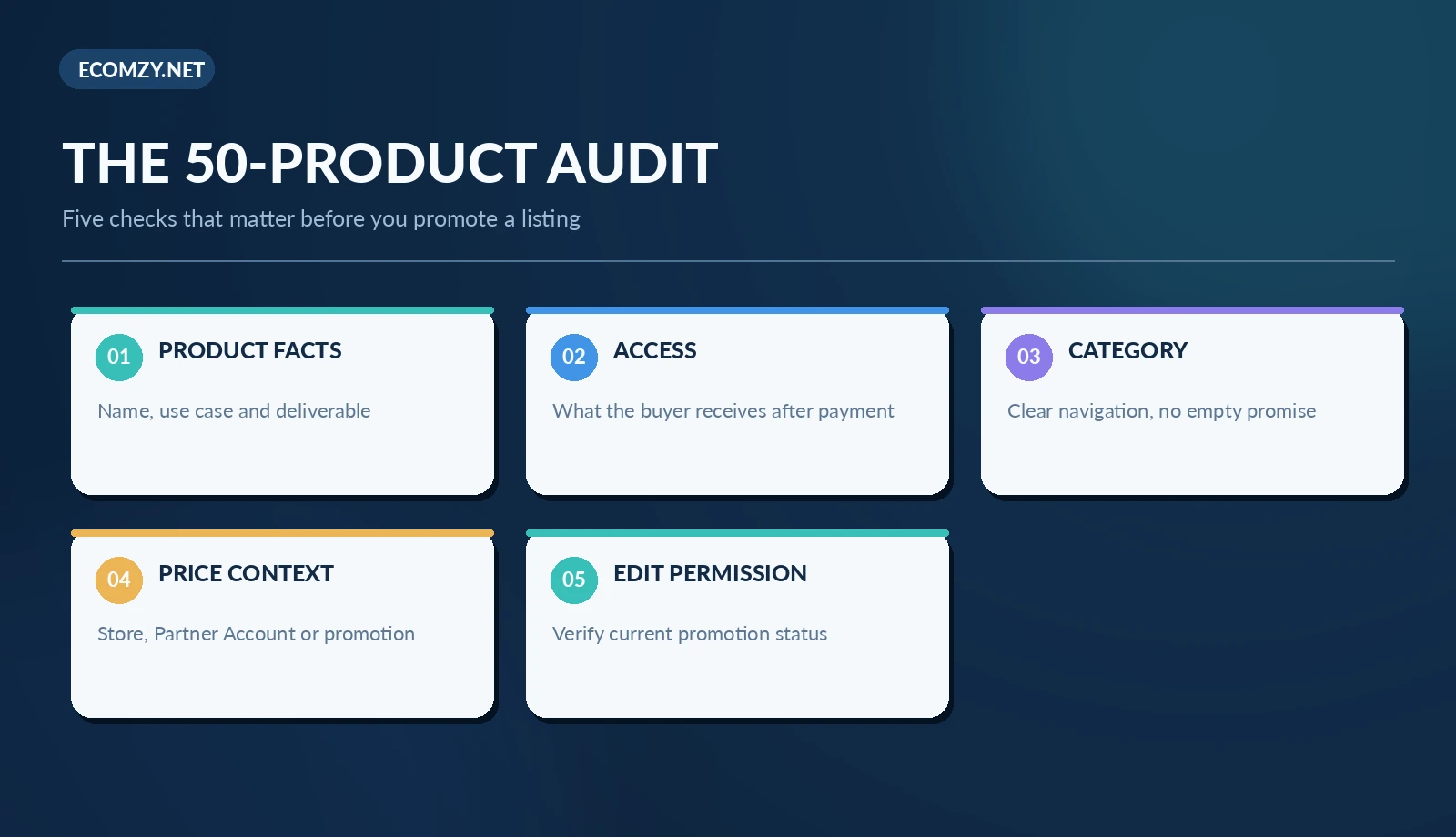
Start with the live storefront, not only the management screen. Open several product pages as a visitor and check whether they make sense without insider knowledge. A product page should make clear what the buyer receives, whether access is instant or requires another step, which devices or file formats are relevant, and whether any meaningful limitations apply. Do not infer facts from the thumbnail that the description does not support.
Next, review all 50 in a spreadsheet. Your columns can be straightforward: internal ID, URL, name, category, price shown, buyer promise, asset format, delivery note, publication status, last review date, and whether an Ecomzy promotion is active. The time investment is modest compared with finding problems after a buyer has paid. A quick color code can identify pages needing better explanation, potential overlap, and missing delivery details.
Then test navigation on mobile. Can someone reach a product from the homepage without excessive taps? Does the product show a meaningful cover and working purchase route? Can you locate refund or access information? You are verifying the customer-facing result, not presuming every administrative control exists in the same place in all accounts. Save screenshots of unusual behavior and bring specific URLs to support rather than reporting “the catalog is broken.”
What can a store owner edit?
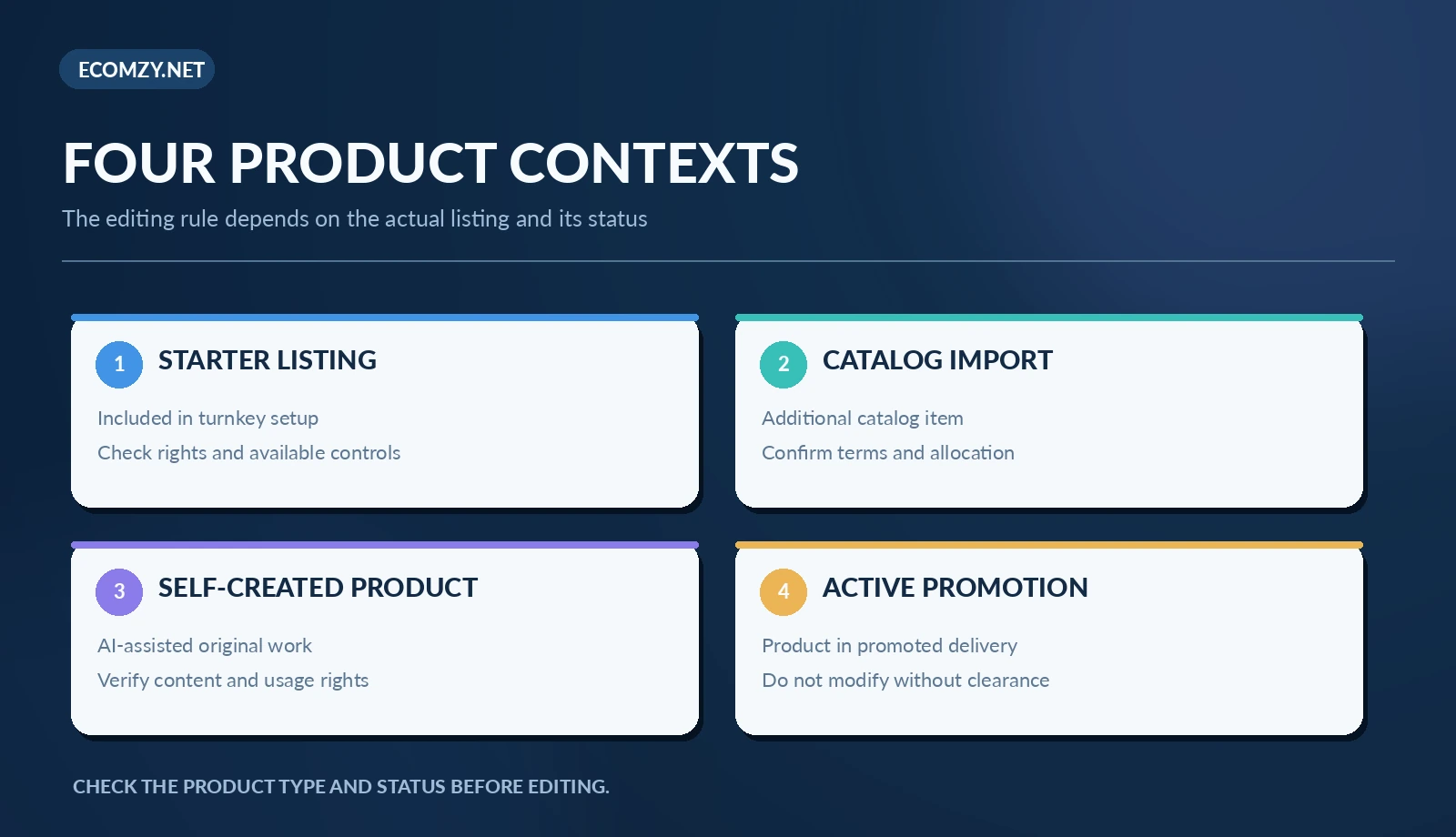
Ecomzy’s homepage presents a flexible digital-product workflow in which owners can build products with AI, update them and set prices. However, the Terms of Service separately say that Partner Account listing prices are platform-controlled and cannot be modified by the customer. These statements should not be collapsed into “you can change every price everywhere” or “no prices can ever be changed.” They refer to different contexts, and an account may expose more than one type of listing.
There is an additional restriction for items being actively promoted through the Ecomzy Promotion Service. The terms prohibit price changes and material edits, replacement, removal or deactivation of promoted listings after promotion starts. This is a significant operational constraint: a routine content tidy-up can become a policy problem if the item is inside an active promotion.
Before editing, identify the exact system and status of the product. Is it a self-created digital asset, an imported catalog item, a Partner Account item, or a listing currently under promotion? If the answer is unclear, use support to confirm what changes are permitted. Do not change prices as an experiment or use an external WordPress plugin to bypass a platform-level rule. A technically possible edit is not necessarily an authorized edit.
How a safe change process works
For a listing with documented editing permission, start by describing the problem in one sentence: for example, “the buyer cannot tell whether the planner is printable or editable.” Change only what addresses that issue. Keep a copy of the existing title, description and screenshots. Review spelling, factual product claims, pricing and access requirements before publishing the revision.
If the product may be receiving promotion, stop before changing it. Check whether the relevant service allows changes and whether the promotion must end or be formally approved first. Record the support response or account notice. It is safer to delay a small SEO adjustment than to make an unapproved modification to a promoted listing and potentially interrupt delivery.
After an authorized change, check the live page in a private browser window. Confirm that the visible title, link, preview image and access information match the revised copy. Also consider whether a headline change breaks links from emails, external posts or internal recommendations. The edit is finished only when the public experience works. This routine is an editorial recommendation, not a claim about the layout of any particular Ecomzy dashboard.
Adding products: three paths with different obligations
The first path is to retain the initial 50 while improving presentation where permitted. This preserves a simple launch configuration and avoids a large inventory review. The second is to import from the wider catalog or use a catalog upgrade service. This increases selection, but someone still has to check fit, category quality and customer-facing descriptions. The third is to create an original digital product, which introduces the additional responsibility of verifying the content, rights and promises you make.
For any addition, consider whether the product helps a clearly defined buyer. A hundred loosely related listings may make search, navigation and brand positioning harder than a smaller collection. Ask whether the new item solves a different problem or merely repeats what three existing listings already claim to do. Customers should be able to understand a difference before reaching checkout.
If you purchase the documented Catalog Upgrade Service, check the target store and intended niche carefully. The terms say you should contact Ecomzy shortly after purchase if you want the addition sent to a different compatible store or need to correct the niche. They also describe using General Store items when the chosen niche cannot fill the ordered quantity. Read the current checkout terms for the precise timing and eligibility rather than assuming every request can be changed after fulfillment begins.
Price, margin and the misleading simplicity of a product card
A storefront price is the amount a buyer sees, not automatically the store owner’s final earnings. The public site has presented illustrative “you keep” values, while the formal terms describe platform commissions, processing-related charges and distinct service models. The only safe way to understand a specific transaction is to identify its channel, current fee schedule, and actual accounting statement. A generic percentage shown beside a sample item is not a universal payout formula.
Keep three figures separate in your notes: the customer-facing listed price, the amount attributed to the store or partner under applicable terms, and the amount ultimately eligible for redemption or payment after charges and conditions. If you cannot locate one of these figures, mark it unknown instead of calculating a precise profit from incomplete inputs. The same discipline applies to advertising and order-processing credits, which pay for different platform services.
This is especially important when deciding whether a new product deserves promotion. Demand, content quality and price can all matter, but changing an actively promoted listing may be restricted. Set your factual product description and obtain clarity on pricing before committing a listing to a promotion workflow wherever possible.
Digital access and buyer expectations
The homepage emphasizes instant digital delivery. That is a helpful promise only when the product page explains what “access” actually means for that item. A downloadable PDF, an interactive web tool, a license key and a course enrollment can all be delivered digitally, but they produce different customer expectations. Do not assume every starter product is a downloadable document or that the same support path works for every format.
Inspect actual product descriptions and, when permitted, a test checkout or sample access flow. The buyer should know whether a login is needed, whether the content can be saved, and whether time-limited access or usage restrictions apply. If the terms are silent, request clarification before making a promise in your marketing. A sales claim such as “works offline forever” needs proof; “digital access after purchase” is much narrower.
Separately, avoid equating “instant access” with an unconditional refund policy. Digital delivery and refund eligibility are governed by the actual checkout terms, product conditions and applicable law. If your page includes a support link, verify that it reaches someone who can identify a purchase and resolve access problems rather than a generic marketing inbox.
A practical first-week product review schedule
On day one, record the actual 50 installed listings and save the catalog snapshot. Day two is for reading the ten most prominent product pages with fresh eyes. On day three, inspect the category structure and mobile navigation. Day four is for questions about licenses, delivery and support; group questions into one clear request rather than sending unrelated tickets. On day five, review any authorized description corrections and test them on the live site.
There is no need to replace all 50 immediately. Some products may be perfectly adequate, and editing every title at once creates unnecessary risk. Prioritize the pages people are most likely to encounter and the gaps that affect understanding, access or compliance. A small list of verified improvements is better than a large set of guesses.
When to contact Ecomzy support
Contact support when the issue concerns product-level permission, an active promotion, an unexpected missing starter listing, a mismatch between terms and account controls, or the way a catalog addition is allocated. Provide the store URL, product name or ID, the exact account context and a screenshot that does not expose customer information. Ask a narrow question that can produce an actionable answer.
For example: “This is a catalog-imported item in Store A. It currently appears in Promotion Service reporting. Are description edits permitted while it is promoted, and if not, what is the approved sequence?” That is much better than asking whether you can “edit products” in general. Likewise, “Does the initial 50-product selection vary by account or niche?” is more precise than assuming every new store should match a screenshot.
Keep the written answer with your original product snapshot. When the platform changes its catalog or terms, you can revisit decisions using the current policy instead of relying on memory. This is especially valuable if several people manage the same store.
Frequently asked questions
Are the 50 starter products identical in every Ecomzy store?
The terms describe 50 random products in the default turnkey setup. They do not publish a fixed item-by-item list guaranteed to every account. Check your own catalog instead of treating promotional examples as an exact starter inventory.
Does 50 mean the catalog cannot grow?
No. Ecomzy advertises a wider product catalog and documents product-addition services. That does not establish that every listing can be imported at no extra cost or without eligibility limits; the relevant account and service terms control.
Can I change the price of any preloaded product?
Do not assume so. The public homepage describes pricing control for a product-creation workflow, while terms restrict Partner Account prices and changes to actively promoted listings. Identify the item type and promotion status first.
What is the safest first improvement?
Review whether buyers understand the deliverable, access requirements and product use case. Correct supported, non-promoted content only where you have permission, and verify every public-facing change.
Editorial conclusion
Fifty starter products give a new store a useful starting point, not a finished merchandising strategy. The stronger approach is to document what actually arrived, check the rights and buyer experience, understand which settings are editable, and develop a coherent catalog without disturbing active promotions. Ecomzy’s starter listings, broader catalog, self-created digital assets and Partner Account are related but not interchangeable. Keeping those distinctions visible is the simplest way to avoid costly misunderstandings.
Sources and review date: Ecomzy homepage and Ecomzy Terms of Service (sections 1.0, 1.1.2, 2.2 and 2.14.6), reviewed October 28, 2026. Related reading: How the Ecomzy Product Catalog Works and How to Choose Products for Your Ecomzy Store. This is independent editorial guidance, not an account screenshot or a guarantee of results.
Join the discussion
Share a question, correction or useful experience related to this article. First-time comments may be held for moderation.