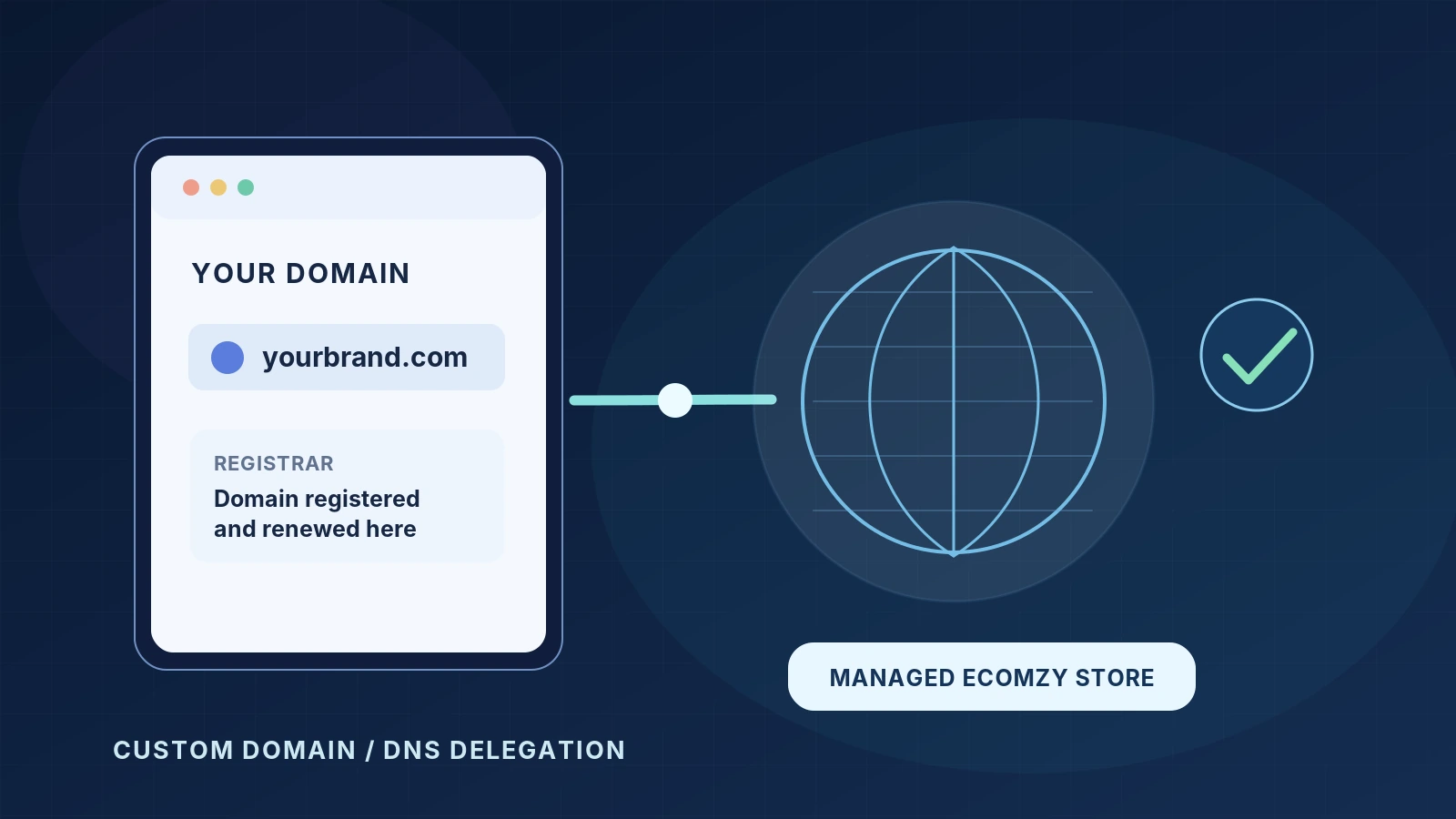
A custom domain makes an online store easier to identify and gives its owner a web address that can be used consistently in emails, profiles and promotional materials. Connecting one to Ecomzy, however, is not simply a matter of typing a domain into a dashboard. Ecomzy’s published procedure for a managed turnkey store requires a support request and a change to the domain’s authoritative nameservers. That creates important questions about domain ownership, existing email services, timing and search visibility.
This guide explains the procedure supported by Ecomzy’s current public terms, then walks through the checks that reduce downtime. It is designed for someone who already owns a domain or is preparing to register one. It does not supply made-up Ecomzy nameserver values or pretend that the user has WordPress hosting access that the platform normally withholds.
First, distinguish four things that people call “the domain”
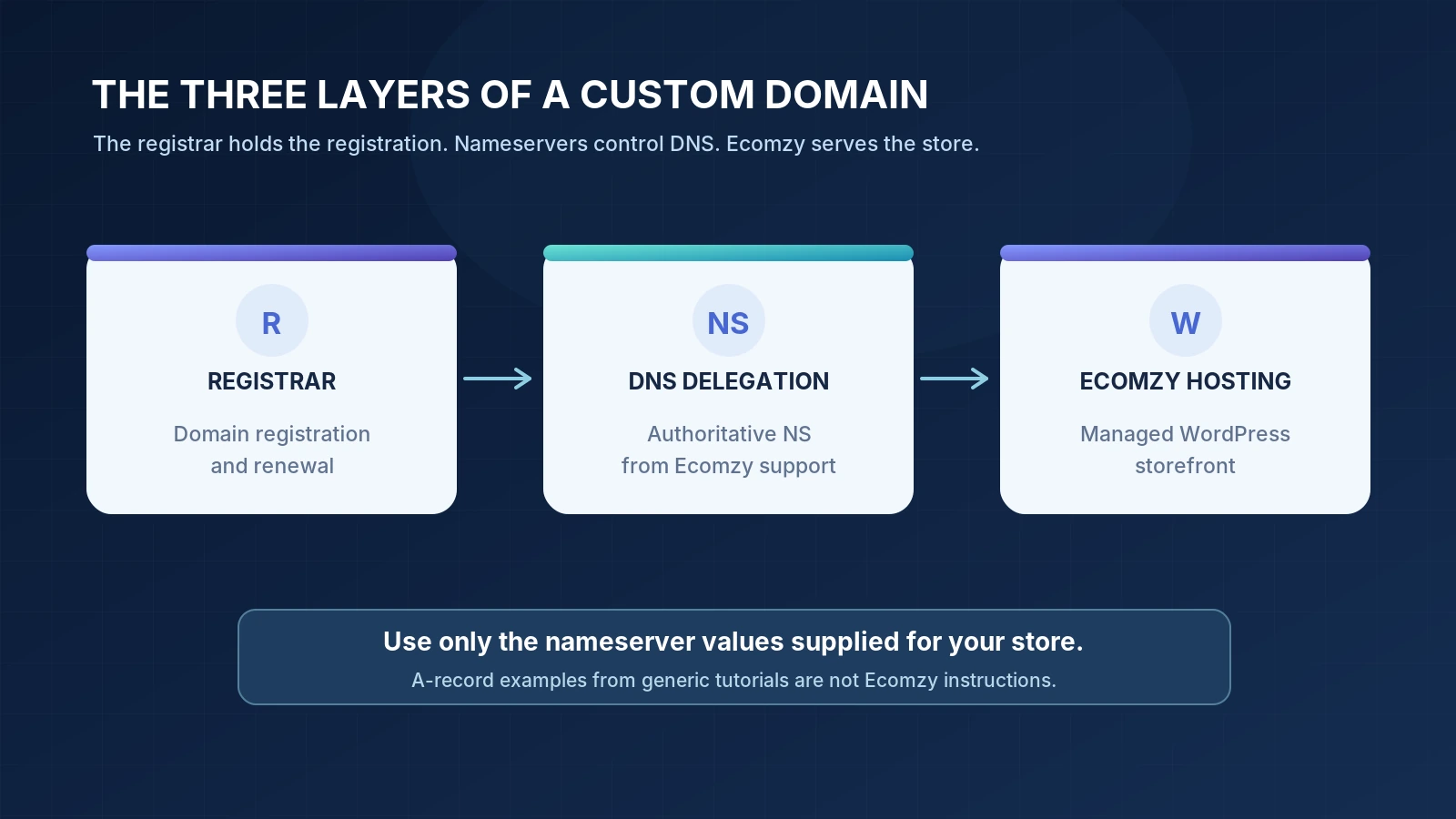
A registrar is the company through which a domain is registered and renewed. A domain name is the address, such as example.com, recorded at that registrar. Nameservers are the authoritative DNS servers responsible for telling the internet where the domain’s services live. Web hosting is where the store software and pages run. These can involve different companies even when a seller purchases everything through a single checkout.
This distinction matters whenever instructions say "connect your domain." If you change only a DNS record but Ecomzy asked you to replace nameservers, the store may never be linked. If you transfer registration instead of changing delegation, you could create a needless administrative problem. Work from the actual nameservers supplied by Ecomzy for your specific store.
What Ecomzy’s terms actually require
Ecomzy’s Terms of Service describe a free turnkey store that can use either a platform-provided domain or a domain owned by the customer. The stated procedure for using your own name is unusual enough to merit reading carefully: first select a free domain during the store survey, then email [email protected] to request the switch to your already purchased, active custom domain.
The terms say that, following the Ecomzy PRO order, the support team sends the required NS records by email. The store can be built on the custom domain only after the domain’s nameservers have been updated and the changes have taken effect. Ecomzy warns that registrar-side propagation can take up to 48 hours and that the move generally needs another one or two business days after the nameservers have changed successfully. Those are stated timing estimates, not a guarantee of a specific launch hour.
The terms also state that the first domain switch is free and that each additional switch, starting with the second, requires a $48 one-time payment in the currently visible terms. Earlier indexed versions quoted a different amount. Since price wording can change, check the live terms and obtain a current confirmation from support before asking for another switch. Do not rely on an archived screenshot or a previous article for a fee that applies today.
Finally, Ecomzy states that it does not set up redirects from the old platform-provided domain to a replacement domain after a domain-name change. That is a real search and user-experience consideration. A new custom address may work correctly while old bookmarks and search links continue to lead to outdated URLs.
Before you make a change: a preflight inventory
Write down the domain you intend to use, the registrar’s name and the login method by which you manage it. Confirm the domain is not expired, suspended or subject to a registration hold. Check whether the name already hosts a website, receives email, or uses subdomains for third-party services. If it does, switching authoritative nameservers can affect more than a storefront.
Export or record the existing DNS zone where the current provider allows it. At minimum, preserve web records (A, AAAA, CNAME), mail-routing records (MX), verification records (TXT), mail authentication records (SPF, DKIM, DMARC) and any service or subdomain records that matter. The purpose is not to copy everything indiscriminately; it is to know what must remain reachable after delegation moves.
Confirm the domain registration’s current nameservers and whether DNSSEC is enabled. DNSSEC uses cryptographic validation and can cause a domain to become unreachable if delegation and signing records no longer match. If DNSSEC is active, ask the registrar or the future DNS operator for the correct transition procedure before changing NS. It is not safe to assume that all providers manage DNSSEC automatically.
Choose the canonical public address before you begin. Do you want example.com or www.example.com to be the primary storefront URL? Ecomzy should confirm which forms it provisions and how the unused form behaves. If your domain has existing email, tell support that mail continuity is a requirement. Some simple website-oriented connection instructions overlook the separate infrastructure email needs.
The practical connection sequence
Step 1: purchase or confirm your own active domain
Choose a registered domain that you control. Verify that you can edit its nameservers at the registrar. Do not confuse a reseller’s billing dashboard with the actual domain-management interface; if the name was acquired through a reseller, the place that accepts NS changes may be different from the place you originally paid. Keep renewal and account-recovery details under your control, and enable appropriate account security.
Step 2: complete the Ecomzy store survey as instructed
The public terms explicitly say to select a free domain in the survey first, even when you ultimately want to use your own domain. Follow that documented procedure rather than assuming a free-text field will configure everything automatically. Keep the order confirmation and any support ticket or email reference. Those records make it easier to match the custom-domain request to the correct subscription and store.
Step 3: ask Ecomzy support for the nameservers
Send [email protected] a concise request with the email associated with your Ecomzy account, the store you intend to connect and the exact custom domain. Ask for the authoritative nameserver values, confirmation of the expected primary hostname, any required email records and the expected sequence of activation. If you are replacing an existing domain, explicitly disclose active email or subdomains.
Do not invent ns1 or ns2 hostnames from a tutorial. Only values supplied for the actual Ecomzy configuration should be entered. The official terms describe delivery by support email rather than publishing universally applicable NS values. It is equally important not to paste example IP addresses found in generic DNS guides into a production configuration.
Step 4: verify what the future DNS service will host
Before replacing delegation, ask how existing mail records and other required DNS entries will be preserved. Changing nameservers changes which provider is authoritative for the zone; records left only at the former DNS service may stop being used. If the account already sends email from the domain, obtain the necessary MX, TXT and other records from that email provider and confirm how they will be represented in the destination zone.
Step 5: update nameserver delegation at the registrar
Find the registrar’s Nameservers, Custom nameservers or DNS delegation control. Replace the currently assigned authoritative nameservers with the exact values provided by support, and save. Some registrars ask for two nameservers; others allow additional values. Enter the values you have actually received. A registrar may warn about DNSSEC or require an additional confirmation step. Follow its documented instructions and do not disable security settings casually without understanding how they will be restored.
There is an important distinction here. In DNS hosting dashboards you may see an option to edit A or CNAME records. That is not the same as updating the domain’s authoritative NS delegation at the registrar. Ecomzy’s documented managed-store route specifically calls for NS changes. Do not use a generic A-record shortcut unless Ecomzy gives you an explicit alternative in writing for your setup.
Step 6: check the delegation before requesting activation
You can inspect the public delegation using a DNS lookup utility. On Windows, for example, nslookup -type=ns example.com 1.1.1.1 requests nameserver information from a public resolver. Querying another resolver can help detect cached differences. The decisive information is whether the domain’s public NS answers converge on the values support supplied; these commands do not prove the store application itself is ready.
Wait for the change to propagate and allow for the stated window of up to 48 hours. Some resolvers will continue to return cached data temporarily. Repeatedly changing the nameservers during propagation often makes troubleshooting harder. If the authoritative set is wrong after a reasonable period, compare registrar values character by character and ask support or the registrar to check delegation and DNSSEC status.
Step 7: let Ecomzy complete the store-side switch
Ecomzy estimates roughly one or two business days for the store move and access details after successful nameserver changes. That phase is separate from DNS propagation. A domain resolving to the correct infrastructure does not automatically mean checkout, email and the store’s preferred URL are configured. Ask support to confirm completion of the site-side move and the hostname or hostnames that should work.
Avoid public promotion while the store is only partly reachable. Your readers may see inconsistent pages across devices, a certificate warning, or an old landing page if you direct them to the name prematurely. A launch checklist should be based on actual tests of the end-to-end customer journey.
Verify the complete store, not just the homepage
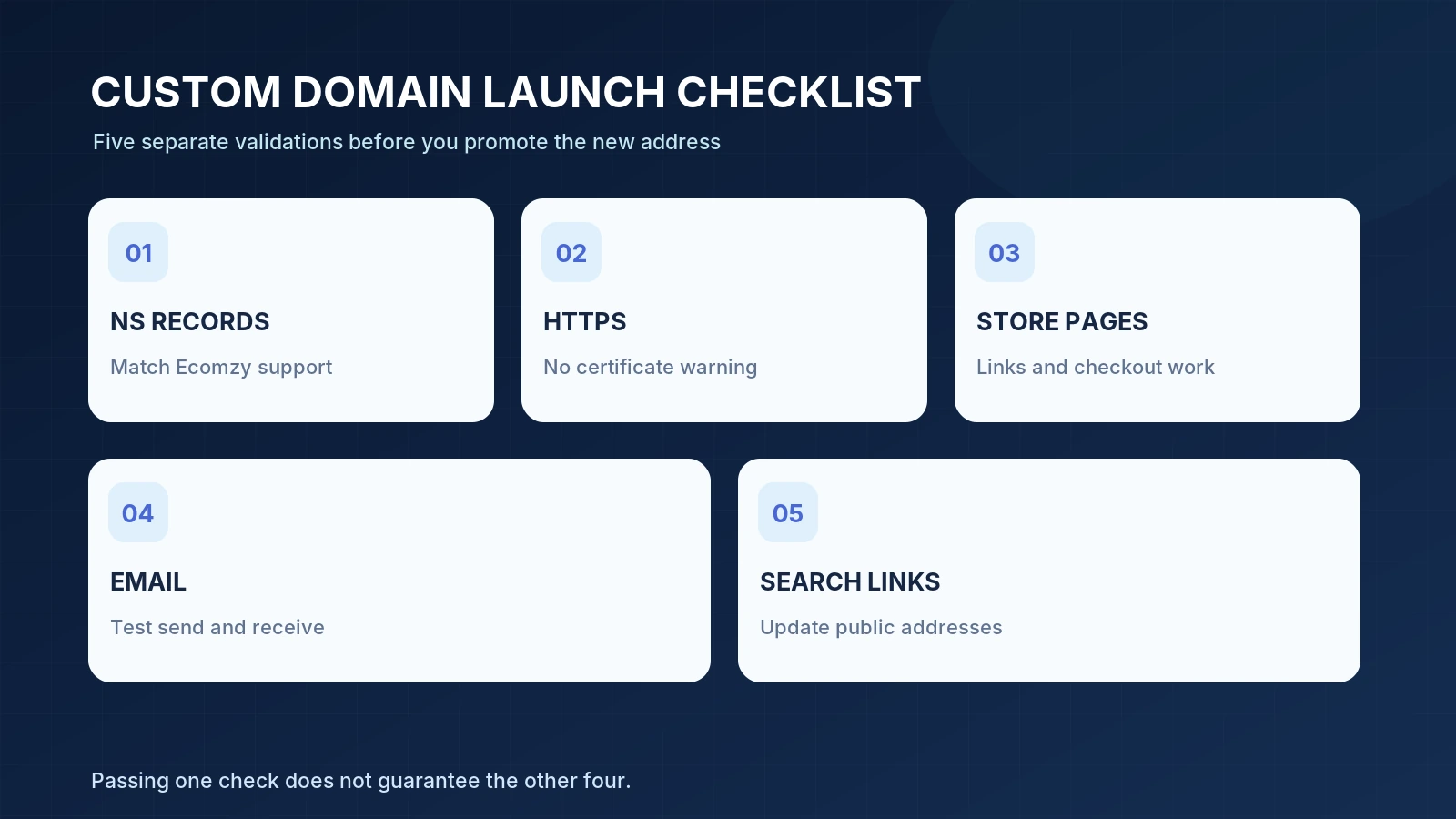
Open the site in a fresh browser session on both desktop and mobile. Test the homepage, at least two product pages, the cart or checkout flow if safely testable without placing an unwanted order, and the contact details. Look for mixed-domain links that still point to the original Ecomzy address. Confirm that the intended HTTPS address loads without a certificate warning and that the other hostname form, if supported, behaves consistently.
If a mailbox is attached to the domain, send a test message to it and another message from it. Receiving and sending exercise different parts of mail configuration. Check that support replies use the expected address and that basic authentication records still exist. Do not assume that a working store means the email system works. If you retain third-party subdomains, test those services separately.
Check the public address shown in navigation, forms, transactional messages and social profiles. Ecomzy states that hosting management is limited and direct WordPress or server access is normally not provided to turnkey-store customers, so fixes to application configuration may require Ecomzy support instead of a WordPress plugin or server command. Keep the issue report specific: affected URL, expected outcome, actual outcome, time and screenshot with sensitive information removed.
Domain switches and Google Search: the redirect problem
A domain change alters public URLs. Google’s site-move documentation recommends mapping old pages to new ones, configuring redirects, testing them, updating internal links and submitting the new sitemap. It also describes the Change of Address function in Search Console for qualifying domain moves. These recommendations are general Google guidance; they are not a statement that Ecomzy provides every required control.
Ecomzy’s published terms say it does not set up redirects from the former Ecomzy domain after a domain-name change. That leaves a gap between the ideal technical migration and what the managed service promises. If old pages had links or search visibility, ask whether any supported redirect solution is available for your particular case, and do not assume one will be delivered. If none is possible, prepare for old links to remain unresolved and for search engines to rediscover the content at the new address rather than receiving clean redirect signals.
Troubleshooting by symptom
The registrar accepts my nameservers, but the store will not load. Check whether public NS responses match the supplied values. If they do, the remaining issue may be store provisioning, a missing DNS record, or the application-side move. Send the lookup results to support; do not substitute a random A record.
Some locations load the old website. Cached DNS results can differ during delegation changes. Check multiple resolvers and allow for propagation, but distinguish transient caching from an incorrect authoritative configuration. A persistent mismatch after the provider’s stated window merits a ticket.
HTTPS displays a certificate warning. Do not tell customers to ignore it. Confirm the exact hostname and report the certificate issue to Ecomzy. Certificate installation and renewal may be managed by the platform rather than by the customer.
The website loads but business email has stopped. Review which nameservers are authoritative and whether the necessary MX, SPF, DKIM and related records exist in that DNS zone. Contact the existing mail provider and Ecomzy with the missing record details. Avoid sharing mailbox passwords.
The new address works, but old Google results still point to the former domain. That is consistent with a move lacking redirects. Update what you can control, check the new domain’s indexing, and ask Ecomzy whether an approved solution is available. Do not promise that Google will instantly transfer old search signals.
My registrar does not allow the required NS change. Some registrar setups, particularly tightly coupled DNS services, restrict nameserver modifications. Ask the registrar whether delegation changes are supported or whether a domain transfer would be necessary. A transfer is a separate operation and should not be started without understanding ownership and renewal implications.
Ownership, renewal and access responsibilities
Ecomzy distinguishes its complimentary domain from one the customer already owns. Its terms say a free provided domain belongs to Ecomzy, with future renewal responsibility passed to the customer after the initial registration period. They promise that the complimentary domain will not expire for at least three months after survey completion. A separately registered custom domain remains subject to the contract with its registrar. Confirm your renewal controls, payment method and account recovery regardless of which option you use.
The free turnkey store is hosted as part of the active Ecomzy subscription. That arrangement is not the same thing as independent hosting ownership or unrestricted WordPress administration. Current terms say direct wp-admin, FTP/SFTP, hosting panel, server file and database access are not generally provided unless Ecomzy expressly approves it in writing. Plan technical changes around that managed-service boundary rather than assuming you can modify DNS-related application settings yourself.
Frequently asked questions
Can I connect a domain I already registered?
Yes. Ecomzy’s public pricing page and terms explicitly allow an existing personal domain, subject to the documented survey, support and nameserver process.
Should I enter an A record or change nameservers?
For the managed turnkey-store procedure in the public terms, Ecomzy specifies nameserver changes. Use only the actual values Ecomzy support provides and confirm any proposed alternative with them.
How long does the switch take?
Ecomzy says nameserver propagation can take up to 48 hours with some registrars, followed by approximately one or two business days for the store-side move once the NS update succeeds. Individual cases can differ.
Is changing domains free?
The first switch to your custom domain is described as free. The current visible terms list a $48 one-time fee for each additional switch, starting with the second. Check the live fee before ordering.
Does Ecomzy redirect my old domain to the new one?
Its published terms explicitly say that redirects are not set up from the old Ecomzy domain after the change. This should be considered before building search traffic or distributing the original address widely.
Will my existing email continue to work?
It may, but only if the authoritative DNS setup preserves the required records and the mail service is correctly configured. Check with both Ecomzy and the existing email provider before changing delegation.
A safer way to launch
A custom domain is manageable when the tasks are divided correctly. You control the registration and authorize delegation changes. Ecomzy supplies the required nameservers and handles the managed-store migration. You and support then verify the completed storefront, while any existing email and public links receive separate attention. The critical information gap is not where to click a generic "Connect" button; it is who controls each technical layer and what the platform actually promises about redirects, timing and access.
For the related subscription and store-setup background, consult our Ecomzy pricing overview and Ecomzy store setup guide.
Sources and verification notes {#sources}
- Ecomzy official Terms of Service — own-domain procedure, NS requirement, switch fee, move timing, redirects and access limits; reviewed October 28, 2026.
- Ecomzy Pricing — confirmation of custom-domain availability.
- Cloudflare: how nameserver delegation works — technical background, not Ecomzy-specific NS values.
- Google Search Central: moving a site with URL changes — redirects, mapping and Search Console guidance.
Independent editorial guide. DNS diagrams use representative labels only; they are not Ecomzy account screenshots or instructions to enter example records. Verify current support instructions for your account before making changes.
Join the discussion
Share a question, correction or useful experience related to this article. First-time comments may be held for moderation.