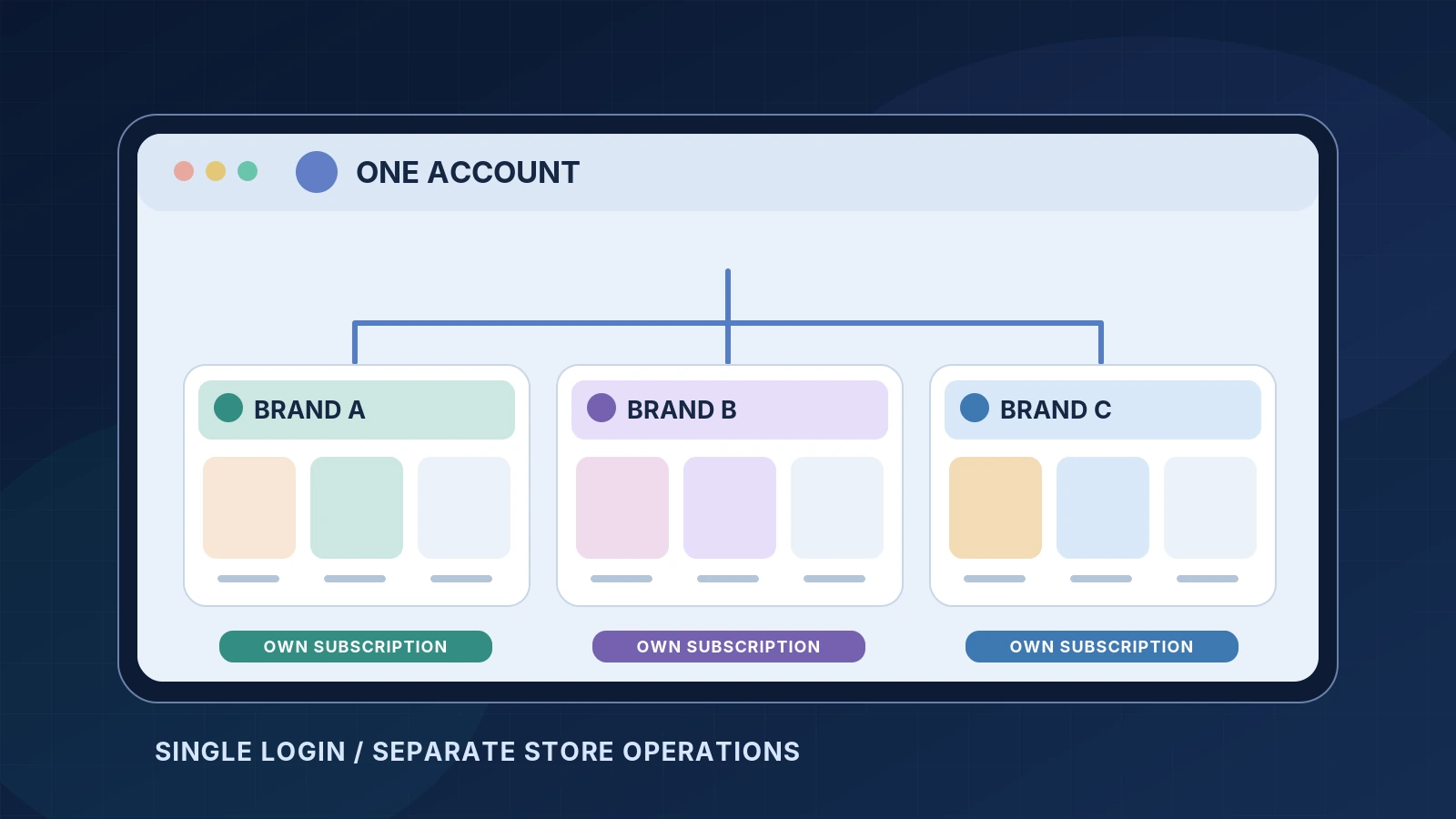
Yes, Ecomzy’s current Terms of Service permit multiple turnkey stores under a single customer account. The limit is up to ten stores associated with one email address. The detail that matters most is less obvious: each additional turnkey store has its own subscription, with separate orders, commissions, purchases and services. One login does not create one shared business pool.
That distinction changes how you should plan a second store. A second niche may be useful, but it is not simply another storefront tab added to your existing plan at no cost. This guide explains the documented account model, the billing trigger for new stores, how separated store resources work, and the operational checks to make before expanding. It also covers the difference between managing several stores under one account and creating several separate customer accounts, which Ecomzy treats differently.
The actual rule: up to ten turnkey stores per account
The Ecomzy Terms of Service contain a section titled "One Turnkey Store per one Ecomzy Subscription." It says that a single customer account, identified by email, may create up to ten turnkey stores. Each is tied to a distinct subscription. The terms explicitly state that clicking Create a Store in the account dashboard constitutes agreement to create a new subscription associated with that store.
As currently published, the terms specify $39 per month per new store subscription, with the first charge occurring immediately when the new store is created. Do not assume that the initial signup offer, an existing trial or the subscription anniversary of your first store applies to the second one. Confirm the amount and renewal date on the creation screen for the new subscription, and retain the order confirmation.
The same published section describes each store and its associated subscription as independent. The newer terms also refer to a Partner Account provided with the subscription and tied to the relevant store. That detail is easy to miss in older tutorials or general statements about running multiple stores: a Partner Account connected to Store A is not a shared balance or service package for Store B.
What the public terms do not fully document is every screen, role permission, reporting filter or multi-store dashboard control available in the account. The supported fact is that the account can create and operate several separate subscriptions. The exact interface beyond the named creation action should be verified in your own dashboard, not imagined from a design mockup.
One account is not the same as multiple accounts
The policy distinguishing these cases is important. Ecomzy permits several turnkey stores under one customer account within the documented limit. A separate section of the Terms says that customers are not permitted to create, maintain or control more than one customer account without prior written consent. It specifically prohibits additional accounts created to get around limits, promotional offers or other restrictions.
In practical terms, opening a second store through the existing dashboard follows a different rule from registering another email identity and treating it as an unrelated customer. If your operational goal is to manage two brands, the supported path is to use the multi-store capability within your existing approved account. If you need genuinely separate account ownership or legal entities, ask Ecomzy for written approval and the correct process.
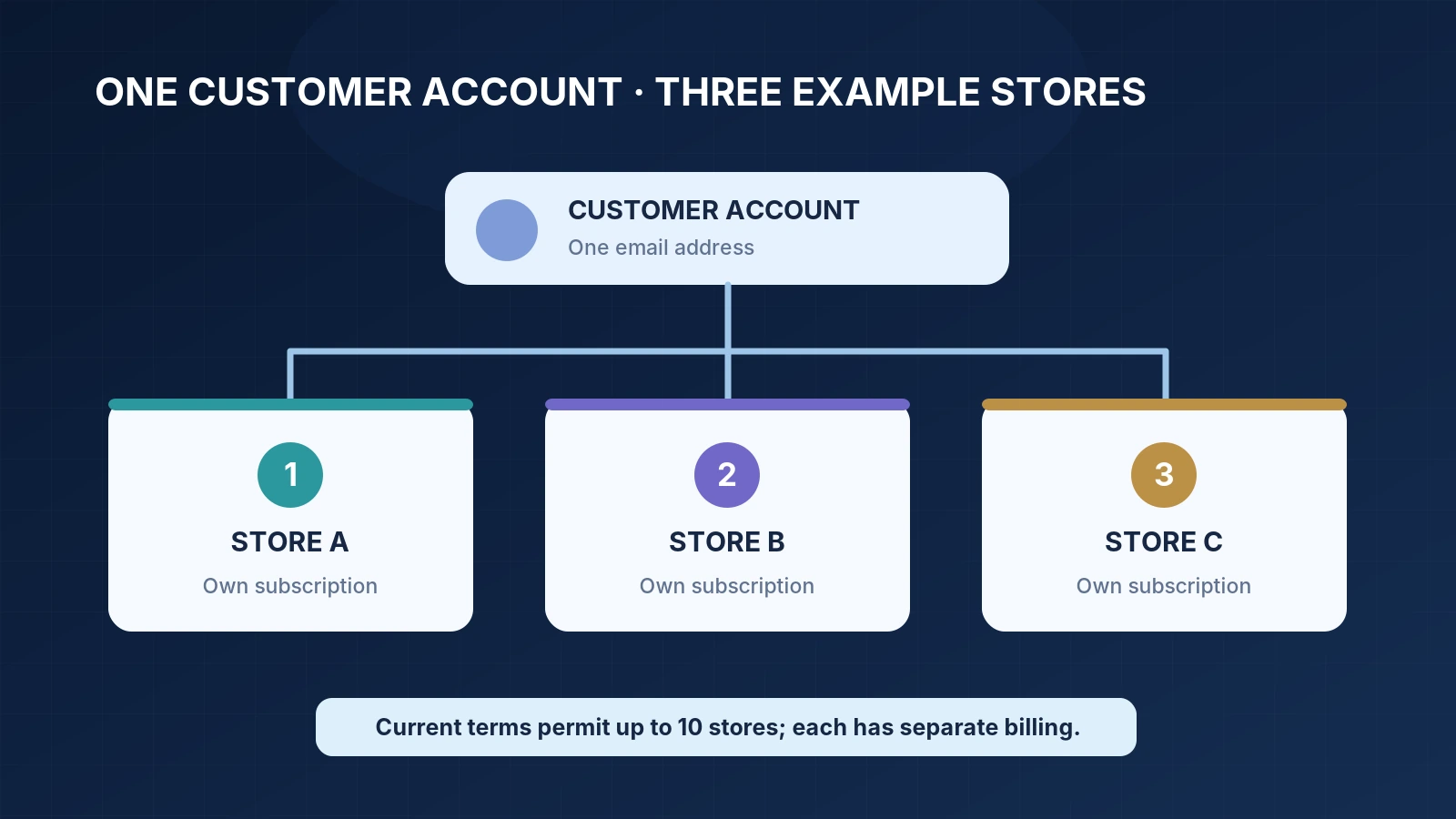
What actually happens when you add Store B?
The official terms identify Create a Store as the initiating dashboard action. Because the full account interface is private, the sequence below divides verified facts from sensible preparation steps; it is not a screen-by-screen reproduction of controls we have not inspected.
Before initiating a second store, decide its purpose, intended products, brand name and target audience. Pick a name that does not confuse customers with the first storefront. Decide whether you will use the domain option included with the new store or request an owned domain. Set aside time for the store’s own access details, legal disclosures and testing. Review the subscription terms as they stand on the day you create it.
Next, find the new-store creation action in your authenticated Ecomzy dashboard. Read any price and plan disclosures before confirming. The terms specify that initiating the new store creates a new subscription and triggers the first $39 charge immediately. If the displayed details do not match the published terms, stop and ask support rather than assuming the lower amount or an extra free trial will apply.
After creation, keep the new store’s confirmation separate from the original store’s records. Verify which subscription belongs to which domain, what the renewal date is and which available tools or services belong to that store. Do not begin with a large marketing purchase. First open the storefront, confirm its active product pages and check the details of its checkout and support experience.
Which resources remain separate?
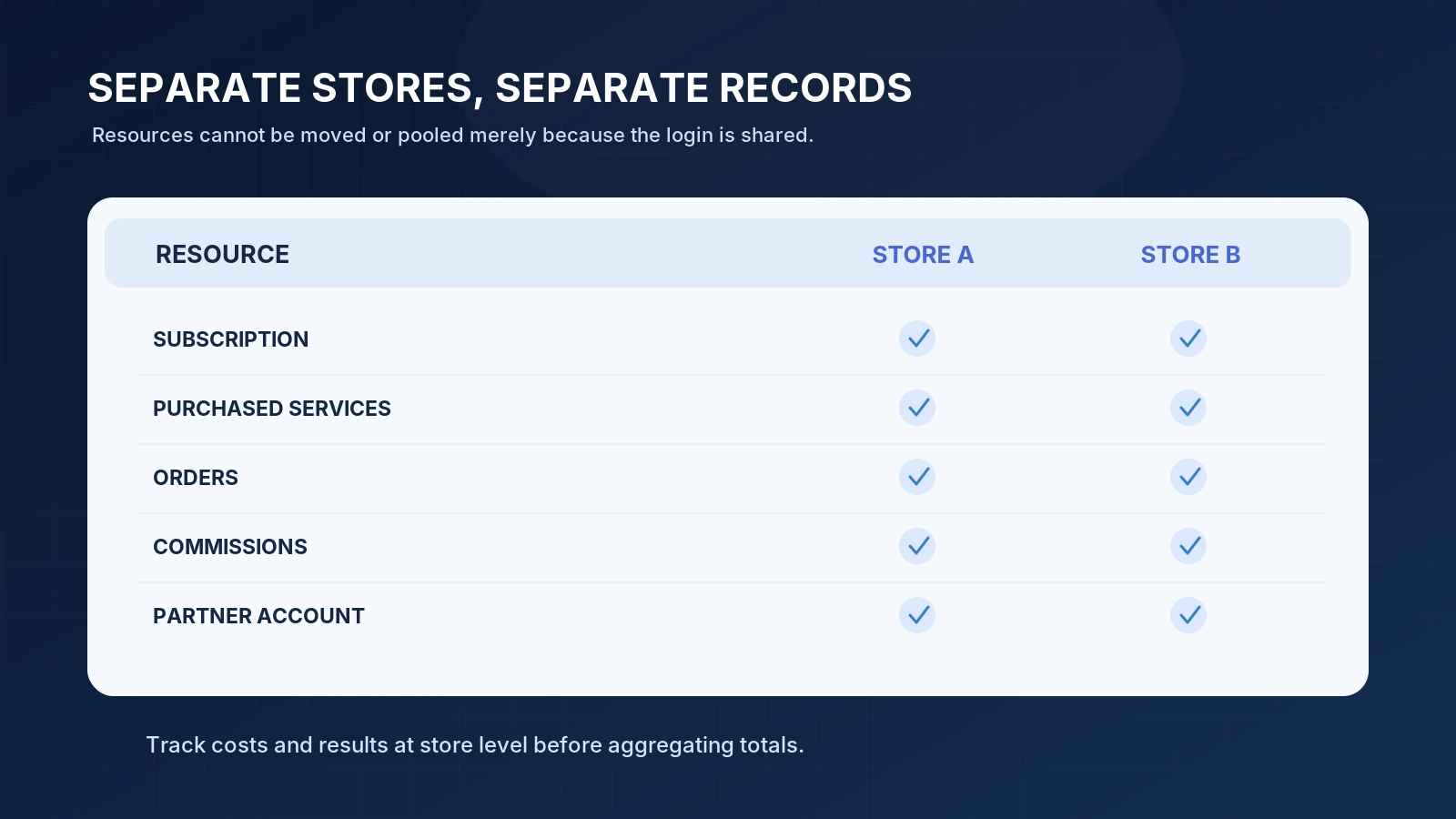
Ecomzy’s terms state that purchases or services acquired for one store do not transfer or apply to another store. They separately say that commissions, payments, orders and services tied to one store or its Partner Account cannot be moved or shared between stores or Partner Accounts. This rules out a tempting but incorrect assumption: a positive balance associated with one store can be used as though it were a common wallet for the entire account.
Consider a hypothetical owner operating a digital-planner store and a language-learning resources store. The owner purchases a promotional package for the first. That package should not be counted as part of the second store’s marketing resources unless Ecomzy explicitly documents a separate entitlement for it. Likewise, a commission earned by one store cannot simply be recorded as if earned by the other. Your personal budget can cover both businesses, but the platform’s internal balances are not pooled by default.
A Partner Account adds another boundary. The newer terms describe it as linked to the store’s own subscription and offering the same products through Ecomzy-operated channels. The terms do not allow commissions, orders or services to move freely between the Partner Accounts associated with different stores. Do not describe Partner Accounts as unlimited affiliate slots or assume that one Partner Account can be switched to another store at will.
When reviewing any dashboard totals, establish their scope. Does the number describe a single store, its Partner Account or the entire customer account? A screen label that looks like "Revenue" or "Balance" is not enough context on its own. Exportable figures or screenshots should include the relevant store identifier, the date window and the definition of the amount. Otherwise two identical-looking balances may describe different things.
Why store-level accounting is not optional
A multi-store operator needs a separate ledger for each store, even if the same bank account pays the subscription charges. Record subscription invoices, optional service purchases, storefront sales, processing charges, credits, refunds, commissions and any amounts not yet available for use under the correct store. Do not turn a pending balance into a cash receipt simply because it appears in a dashboard.
The simplest working ledger has one row per transaction and a required store column. A second column identifies the transaction type: recurring fee, one-time service, order, commission, adjustment or payout. Keep a date, amount, currency, evidence link and state such as paid, pending or reversed. Avoid duplicating a transfer or counting the same order once in a store report and again in a Partner Account report unless the underlying accounting rules clearly call for both entries.
Monthly subscription exposure rises with each active store. The price in the current multi-store clause is $39 for each new subscription, but the same platform also describes higher-tier PRO plans and optional services. Do not treat the baseline fee as a complete monthly operating cost. A second store may incur its own additional services, domain renewals and promotion spending. Model those costs separately before you decide that diversification has improved your economics.
A realistic expansion decision
Before creating the next store, ask why the new niche needs a separate public identity. Are the target buyers and product needs genuinely different? Will a different domain help explain the offer clearly? Does the new store require its own social content, support information and product selection? If the products and audience substantially overlap, creating another website may split attention without creating a meaningful benefit.
There are legitimate reasons to separate stores. Two product categories might require distinct trust signals, different onboarding content or different marketing calendars. One audience may expect detailed professional resources while another primarily buys quick personal planning tools. Distinct positioning can make those stores easier to understand. But this is an editorial and operational advantage, not an Ecomzy guarantee of additional visits or income.
Domains and brand identity for separate stores
Each turnkey store needs a public address and a clear identity. Ecomzy’s managed-store terms describe a provided free domain option and a process for connecting an owned domain. The latter involves a support request and nameserver changes, not merely adding a DNS record at random. Domain renewals and domain changes should be tracked against the correct store, especially when more than one subscription exists.
Be careful with old domains. Ecomzy’s terms say that a domain switch does not automatically come with redirects from the former platform-provided domain. Launching a new store is different from moving an old one, but either action can create confusion if you circulate URLs before they are final. See our detailed custom-domain guide when the related article is published; until then, the official Ecomzy terms are the authoritative source.
Subscriptions, trials and renewals
One account can have several renewal dates. The terms specify an immediate charge when a new store is created, while the general PRO subscription description discusses a 14-day trial tied to the original store-access timing. It is unsafe to assume that each additional store repeats the initial trial. Before confirming creation, read the charge summary and the renewal information applicable to that new subscription.
Keep a simple calendar listing the store, its plan, next charge date and payment method. Set a reminder well before each renewal to review whether that store remains useful. This is ordinary financial housekeeping rather than a feature the platform promises to perform automatically for you. If a card fails, the effect may apply to a particular store subscription rather than to every store, but the exact suspension behavior should be checked against the live terms and your account notices.
Ecomzy states that an unpaid subscription becomes inactive on its due date. Another termination provision states that the free turnkey store is deleted after seven days without payment and cannot be recovered, with at least one reminder sent beforehand. That is a significant reason to monitor individual subscription obligations. Do not rely on the continued availability of Store A as evidence that Store B is safe from an overdue payment.
Do you need a different login or team member for each store?
The official multi-store clause permits several stores under one email, but it does not supply a complete permissions matrix for staff accounts, delegates or external contractors. Do not assume that separate WordPress administrator logins are available for each storefront. Current managed-store terms also say that customers do not normally receive direct WordPress Dashboard, hosting panel, database or server access without Ecomzy’s express written approval.
If different people will handle different stores, ask support whether the account offers role-based access, whether each user can be restricted to one store, how approvals work, and what audit records are available. Until those points are confirmed, avoid sharing your main account password as a substitute for proper permissions. A multi-store architecture becomes operationally risky when one shared login gives an outside contractor control over unrelated subscriptions.
Also establish a support procedure. A request about an order, a domain or a service should include the right store identifier. If you work with a Growth Manager, ask whether one person covers all subscriptions or whether assistance is assigned per store. The public descriptions do not guarantee a particular organizational model for every multi-store account.
What happens if you cancel only one store?
Ecomzy’s terms state that a customer may cancel a store and its corresponding subscription through the dashboard or by contacting [email protected]. The existence of multiple subscriptions means that cancellation of one store should not be treated as confirmation that every recurring service under the email has ended. Record exactly which subscription is being cancelled and obtain evidence of the request and its completion.
Before cancellation, download or preserve any records you are allowed to retain, review active service purchases and note outstanding order or commission questions. Do not assume a cancelled subscription leaves the store hosted indefinitely. The managed hosting arrangement is tied to subscription status, and the stated nonpayment policy includes possible permanent data loss. Ask support what happens to domain renewal, paid tools and any store-specific Partner Account access.
If you intend to keep Store A while discontinuing Store B, verify the current status of both afterward. The positive result is not just a confirmation email; it is that Store B’s relevant recurring charge has actually been cancelled while Store A remains active with its expected plan and services.
Comparing two operating models
A single-store model gives you one primary domain, one subscription and one set of operating records. It is often easier to maintain a coherent voice, check the catalog and watch expenses. A multi-store model gives separate brands and distinct audiences, but adds recurring obligations and requires clear separation of data and purchased services. Neither is inherently better. The right choice depends on how much real differentiation the second storefront can offer.
Avoid a common accounting error: comparing one established store’s revenue with the combined revenue of two stores while ignoring the additional subscription and service costs of the second. Likewise, do not treat the number of stores as a proxy for the size or quality of an audience. A well-maintained, well-positioned single store may be preferable to several thin websites with nearly identical descriptions.
A checklist before creating Store B
First, confirm your first store’s subscription status and make sure you understand the second store’s immediate billing trigger. Second, document the new store’s audience and product purpose in one paragraph that would not also describe your first store. Third, choose a domain strategy and decide whether an owned domain is required. Fourth, establish a store-level budget and ledger. Fifth, ask how the associated Partner Account and optional services are allocated.
Next, prepare a content calendar and a basic customer-support plan. Verify that the brand name and product copy do not duplicate the first store so closely that the two websites confuse visitors. Finally, decide what you will measure after launch: product-page interest, qualified visits, actual order activity or support burden. A second storefront should answer a business question, not merely increase the number displayed in an account dashboard.
Frequently asked questions
How many Ecomzy stores can one account have?
Current Terms of Service permit up to ten turnkey stores under a single customer account or email, each associated with its own subscription.
Is the second store free if I already pay for one?
No. The published multi-store clause states that each newly created store carries its own $39 monthly subscription and that the first charge occurs immediately upon creation.
Do stores share commissions and orders?
No. The terms prohibit moving or sharing commissions, payments, orders or services between stores or their respective Partner Accounts.
Can I use a different email to get more than ten stores?
Do not assume that is permitted. Ecomzy’s separate multiple-accounts policy restricts creating more than one customer account without prior written consent.
Can I move a service I purchased for Store A to Store B?
The general rule says purchases and services for one store do not transfer or apply to another. Obtain an explicit answer from support before buying if your use case depends on a transfer.
Can I cancel one subscription without cancelling the whole account?
The terms provide for cancelling each store and its corresponding subscription. Confirm the exact subscription and verify all remaining stores and charges afterward.
Bottom line
The answer to "Can I run multiple Ecomzy stores under one account?" is yes, within a documented limit of ten. The more important answer is that these are separate businesses in operational terms, even when they sit behind one email login. Treat each store as having its own subscription, resources, domain, reporting and customer responsibilities. That makes it possible to compare opportunities without mixing financial results or assuming a benefit that the platform has not promised.
For general platform context, see our How Ecomzy Works section, Ecomzy pricing research and store management guides.
Sources and verification notes {#sources}
- Ecomzy Terms of Service — "One Turnkey Store per one Ecomzy Subscription," Partner Account, multiple-accounts restriction and termination provisions; reviewed October 28, 2026.
- Ecomzy official pricing information — baseline plan context.
- Ecomzy.net research hub — related independent guides and definitions.
Independent editorial guide. Illustrations are conceptual diagrams, not verified screenshots of a private customer dashboard. Confirm plan fees and account-specific entitlement details before creating an additional store.
Join the discussion
Share a question, correction or useful experience related to this article. First-time comments may be held for moderation.