
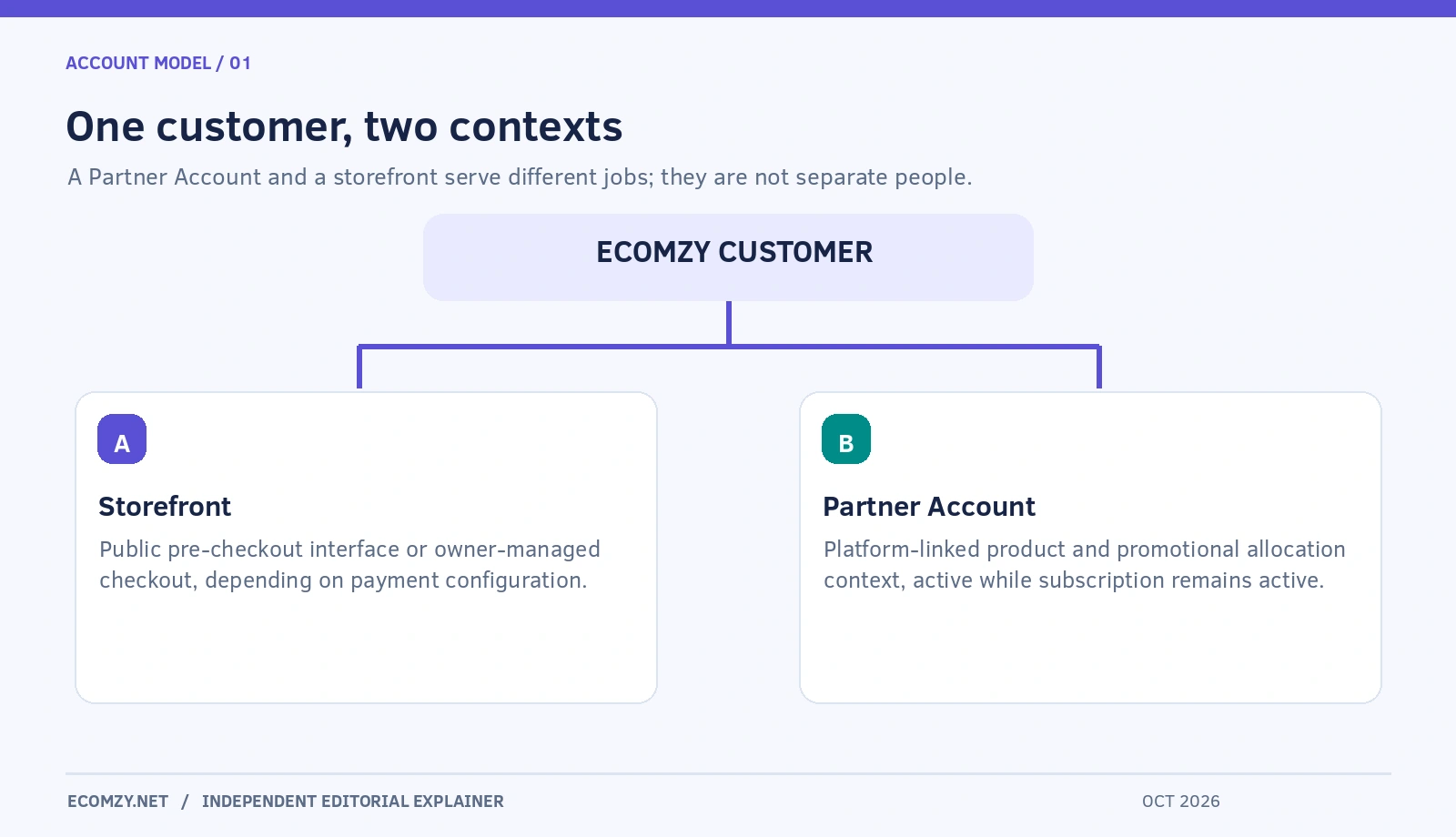
Two labels on Ecomzy can sound like two businesses: Storefront and Partner Account. They are not. The current Ecomzy Terms of Service say that a Partner Account comes with the subscription and operates alongside the store, while the word “Partner” refers to the same customer when Ecomzy discusses promotional Commission. The store is a buyer-facing interface with a particular payment configuration. The Partner Account is the platform-linked context in which Ecomzy can attribute activity and allocate promotional incentives.
That distinction is easy to miss because marketing language uses terms such as store owner, partner, seller and business almost interchangeably. The labels matter operationally: a person can have a Storefront that sends buyers to Ecomzy Mall, participate in the Partnership Program through a Partner Account, and still not be the merchant accepting the Mall customer payment. This review explains the actual boundaries and the controls that should be verified before anyone edits listings, interprets an order or assumes they own an advertising placement.
One subscription, a store and a Partner Account
Under Section 1.1.1 of Ecomzy’s Terms of Service, the subscription provides an Ecomzy account, a turnkey WordPress store and an associated Partner Account. The Partner Account is linked to the subscription for that store and remains available only while that subscription is active. It carries the same product selection through Ecomzy-operated channels, but that does not make it another fully independent storefront with its own checkout controls.
The Terms further explain in Section 1.2.1 that “Partner” is a label for the same customer in the Commission context. It does not confer a separate type of user or a different legal status. This is the answer to a practical question users may not find in a quick feature overview: why does the platform talk about “partners” when the person purchased a normal store subscription? The label is tied to a specific promotional mechanism, not to a second business registration or automatically separate login.
Owners should therefore organize records by their assigned store subscription and its related Partner Account. A new store may create a new subscription and corresponding Partner Account, but it does not erase the distinctions between buyer payments, store content and promotional allocations.
The Storefront is defined by its payment configuration
The public WordPress site is where a visitor may encounter product information, descriptions and a route to purchase. When the owner has not connected their own payment system, the Terms call this a Storefront Configuration. Its job is pre-checkout discovery: it captures shopping intent and sends buyers to Ecomzy Mall. Ecomzy becomes the seller and handles the buyer payment, receipt and payment disputes.
A different configuration exists for a customer who connects their own independently operated payment system. In that case, the customer manages checkout, receives funds, acts as the seller and takes on refund and payment-compliance obligations. Ecomzy says it has no visibility of those independent customer payments. The label “store” alone is therefore insufficient to determine who the buyer paid. The enabled payment path is what changes the legal and accounting duties.
These configurations can be confusing when reading Ecomzy advertising about a ready-made website with built-in payments. A useful review should rely on the current account and the operative Terms instead of treating one promotional phrase as an account-specific guarantee. The actual shopper flow, checkout entity and order confirmation are all evidence worth recording.
What the Partner Account actually adds
A Partner Account is the context that allows a customer to participate in Ecomzy’s Partnership Program while the underlying subscription remains eligible. The Terms describe Ecomzy Ecosystem Orders that are attributed to the Partner Account, including Promoted and Organic Orders. They also describe Commission as a possible Ecomzy-funded promotional incentive allocated in connection with qualifying activity. No sale automatically guarantees a particular allocation or withdrawal.
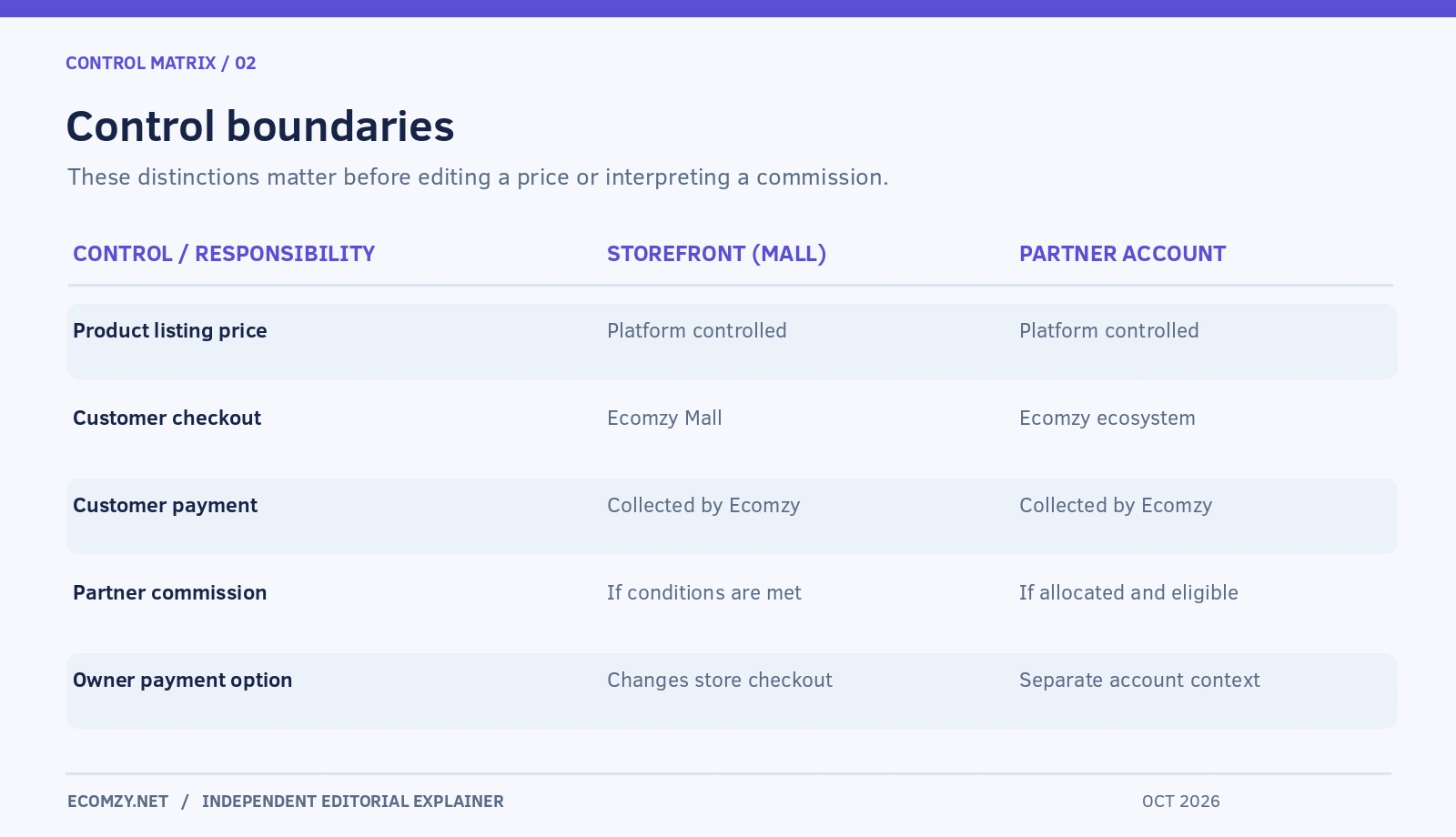
The Partner Account is not a second card processor. It does not transform purchases from Ecomzy Mall into customer revenue belonging to the operator. It also does not confer unrestricted product-price control. The Terms say that product listing prices in the Partner Account are controlled at the platform level, and a customer must not set, override or modify them through other tools.
This restriction is a useful example of where the operational boundary sits. You may be able to review product information, interpret activity or choose eligible services through the Dashboard; you are not granted control over every element of Ecomzy’s own catalog or its ecosystem promotion. Separate the permitted actions from the ones that are merely visible in a generic WordPress interface.
Storefront Orders and Ecosystem Orders follow different paths
An order’s origin is not just a reporting label. The Terms define a Storefront Order as one generated when a buyer arrives at the Mall from a Storefront and the order is not attributed to Ecomzy’s Promotion Service. An Ecomzy Ecosystem Order is a purchase placed through an Ecomzy-operated sales channel and attributed to a Partner Account. The Ecosystem category is divided between Promoted and Organic Orders. Ecomzy determines attribution using its own delivery and transaction data.
This classification means that a customer could see credited activity in the Partner Account without having operated the checkout or sent a buyer from their own website. It also means that visits to the public WordPress site cannot be used as the denominator for every attributed Ecosystem Order. The same dashboard can report activities with different entry points.
A separate Customer Store Order exists when the owner has a personal payment system. In that case the buyer pays the owner and the owner submits the order through their store configuration. The vocabulary is precise because the payment obligations and applicable fees differ; readers should resist reducing all four order names to “sales from my site.”
What the owner controls — and what remains centralized
There are several layers of control. First is the public-facing website: authorized settings, permitted page content and the customer experience. Second is the payment configuration, where a customer-owned checkout carries duties that a Mall-directed Storefront does not. Third is the Partner Account, whose product pricing, attribution and promotional allocation are subject to Ecomzy’s rules. Fourth is the service layer, such as Dashboard subscriptions or campaign tools, whose availability may depend on the assigned version of the Dashboard.
The existence of an administrator menu is not an authorization to edit everything it exposes. Terms for Ecomzy’s turnkey store caution against installing incompatible ecommerce systems, including WooCommerce and plugins designed for them. This matters because an operator trying to “take control” by installing a second checkout plugin could damage the Ecomzy integration and create unsupported behavior.
The sensible test is to classify each desired change before attempting it. Is it a permitted description edit? A pricing change the platform prohibits? A payment-system change with new regulatory responsibilities? A promotion setting that only supplies preferences? Each has a different answer and should not be called generic storefront customization.
Who chooses prices, and why this matters
The current Terms explicitly prohibit customers from changing the prices of Partner Account listings. For a Mall-directed Storefront, Section 1.2.3 also says listing prices are set at platform level. A user attempting to override prices in a database, through an outside plugin or in another layer can breach those conditions even if the frontend temporarily displays the altered amount.
This is not the same as saying that every product in every imaginable customer-owned checkout has identical limits. Ecomzy’s payment models are separate, and owners must establish which products and agreements apply to their own setup. The important point is narrower and verifiable: neither a Partner Account nor a Mall-directed Storefront gives a general right to change Ecomzy-controlled listing prices.
From a content standpoint, operators can improve clarity without rewriting prices. Explain what the buyer receives, avoid inaccurate discount claims, and link toward the accurate seller checkout. A consistent offer is easier for customers to understand, and it reduces the risk of sending paid visitors to a product whose final conditions contradict the promotional copy.
Commission is not a share of the shopper’s card payment
The monetary distinction is central to the entire account model. For Storefront and Ecosystem purchases, the Terms say Ecomzy receives the buyer’s funds as seller and retains them. Those funds are not held for the partner or divided between the two parties through payment settlement. Ecomzy may separately allocate Commission from its own operating funds according to Partnership Program rules, account standing and validation requirements.
The term Commission can sound like a conventional affiliate percentage, but its formal definition matters here. The contractual wording identifies it as a promotional incentive, not the owner’s customer revenue, wages or an automatically payable debt. The program uses its own eligibility, adjustment and redemption conditions. A dashboard number should not be reported as an unconditional cash balance without checking its status and available redemption rules.
This also prevents an accounting mistake: don’t build a financial model that assumes the Storefront owner receives the full buyer checkout value and then “pays Ecomzy a fee” from those exact receipts. In the Mall pathway, buyer funds and customer-paid platform fees are separate flows. For an independent checkout, the owner does receive buyer funds, and obligations differ again.
Why Ecomzy Promotion Service does not simply “promote my store”
The Terms specify that the Ecomzy Promotion Service promotes products available through the Partner Account within the Ecomzy Ecosystem. They distinguish those efforts from advertising the customer’s independently operated website. A Mall-directed Storefront can exist without being the destination of platform-run placements. Promotional configurations may affect selected products or preferred audiences without making the operator the manager of exact ad placements.
This is an important expectation to set before purchasing Ads Credits or assessing results. A report of an attributed order may reflect a platform placement rather than a campaign that delivered visitors to the owner’s domain. The right question is not only “Did the ads work?” but “Which object was promoted, where did checkout happen, and what activity was attributed?”
The answer also helps avoid overlap with external social-media tools. AI influencer materials available for owner-managed posting are a different service from Ecomzy-managed promotional placements. The fact that both are marketed as promotion does not make them the same budget, data source or account permission.
Multiple stores do not create a pooled partner balance
Ecomzy allows up to ten turnkey stores under one customer email, with a distinct subscription and associated Partner Account for each. The Terms specify that products, services, commissions, orders and payments tied to one store or Partner Account cannot be moved or shared with another. An owner managing two brands therefore needs separate operating records even though the login identity may be the same.
Imagine a customer with a study-aid store and a career-template store. The first receives a platform-attributed order and purchases a marketing service. Neither event creates a matching entitlement in the second store. Product availability can overlap, but the subscription and attribution contexts remain separate. This is particularly relevant when an operator uses a spreadsheet to compare both stores or considers consolidating reporting.
Instead of maintaining one undifferentiated “Ecomzy balance,” label the store, subscription and Partner Account in each review. Do not transfer a credit, invent a cross-account offset or assume that a purchase made for the first store automatically enables the same service on the second.
A useful comparison of control boundaries
| Activity | Mall-directed Storefront | Partner Account | Own-payment store |
|---|---|---|---|
| Main role | Buyer discovery and referral | Ecosystem-linked activity and incentive context | Customer-facing retail checkout |
| Buyer payment | Ecomzy collects at Mall | Ecomzy collects for Ecosystem orders | Customer pays owner |
| Listing price | Platform-controlled | Platform-controlled | Depends on applicable product and agreement |
| Attribution | Storefront Order if conditions match | Ecosystem Orders attributed by Ecomzy | Owner’s checkout records |
| Commission | May arise separately under program | Possible subject to eligibility | No Commission from a Customer Store Order |
| Main responsibility | Accurate customer handoff | Follow program and service rules | Manage payment, refunds and disputes |
This is a conceptual comparison, not a claim that a private Dashboard provides exactly three adjacent tabs. The owner-payment path and Partner Account are not mutually exclusive labels for the same person; they describe different aspects of account activity.
What to check in your own Ecomzy account
Start with the subscription record. Confirm which store the subscription supports and whether the linked Partner Account is active. Next, establish the actual payment route on your public site: test the handoff before payment and identify the merchant at the final checkout. Then locate recent orders by type rather than total count. If the interface groups activities differently, ask support for the applicable classification instead of assigning names based on a marketing description.
Review the permissions around product editing and active promotions. A product appearing on your site does not necessarily mean you may change its price. Verify the service attached to each campaign and whether it promotes Partner Account products internally or supplies independent assets for you to publish. Finally, separate your internal reports into Storefront traffic, platform-attributed orders, customer-managed payments where applicable, and Commission eligibility.
Maintain a dated evidence log with relevant account pages and written confirmations. This matters because Ecomzy says Dashboard versions, available features and terms can vary. Public documentation can define a mechanism without guaranteeing that every account has the same visible control or subscription offer.
Where this arrangement can be helpful
A pre-checkout Storefront can reduce the owner’s direct involvement in collecting buyer payments because Ecomzy assumes the seller role on the Mall transaction. For someone who wants to focus on explaining and organizing digital offers, that division of duties may be attractive. The Partner Account gives a way to see selected ecosystem activity and potentially participate in Ecomzy’s promotional program without having to build a separate payment processor.
The benefits are conditional. Platform-level control of pricing and attribution means the operator has less direct control than in a fully independent store. Commission is not guaranteed, and access to the Partner Account depends on an active subscription. Someone who needs to control customer payment, their own checkout records or a custom retail relationship should understand the alternative model and the additional responsibilities it entails.
The best choice depends on the actual operating goal, not whether a webpage calls the product “your business.” A brand-first content site, a platform-attributed Partner Account and an independent seller can all be legitimate arrangements, but they require different reporting and customer communications.
Frequent questions about Storefront and Partner Account
Is a Partner Account a separate account I must sign up for?
The current Terms describe it as part of the subscription for a turnkey store. “Partner” refers to the same customer within the Commission program, not an independent customer identity or legal status. Access is linked to the relevant active subscription.
Do I control the products in the Partner Account?
Ecomzy determines the platform-linked listings and strictly controls their prices. The Terms prohibit unauthorized price changes. Availability and other catalog controls should be confirmed for the assigned account and relevant service.
Can an order appear even if no buyer used my public domain?
Yes, the Terms describe Ecomzy Ecosystem Orders attributed to Partner Accounts through Ecomzy-operated channels. Those are not necessarily Storefront Orders. Source and category are more informative than the fact that a row appears in the Dashboard.
Does linking my own payment gateway remove the Partner Account?
Not automatically under the terminology defined in the Terms. Store configuration and Partnership Program participation are described separately; the Partner Account is tied to the subscription. Confirm your specific integration and eligibility with Ecomzy before changing payment arrangements.
Does an attributed order guarantee a payment to me?
No. Commission is defined as a potential platform-funded incentive with validation and eligibility conditions. The original customer payment is Ecomzy’s sale in the Ecosystem or Storefront model, not a settlement that automatically belongs to the operator.
Which account should I inspect before buying a promotional service?
Check the selected store, its Partner Account, the service description and the checkout total. The Terms explicitly prevent treating purchases for one store as transferable to another. If you manage several stores, do not rely on a shared email address to infer shared entitlements.
Editorial verdict
The simplest reading of Ecomzy’s model is not two interchangeable accounts. It is one customer with a Storefront configuration and an associated Partner Account, each answering a different operational question. The Storefront helps explain where a buyer began and who processes checkout; the Partner Account helps explain ecosystem attribution, services and potential Commission. Keeping those functions separate makes the platform easier to evaluate, avoids misleading earnings claims and helps owners understand where their control genuinely ends.
Sources and review date: Ecomzy Terms of Service, Sections 1.1.1, 1.2, 1.3, 1.4 and 2.14, reviewed October 28, 2026. Related reading: How the Ecomzy Dashboard Works, Ecomzy Product Catalog and How Ecomzy Commission, Redemption and Payout Requests Work. Illustrations are conceptual editorial diagrams, not private account screenshots.
Join the discussion
Share a question, correction or useful experience related to this article. First-time comments may be held for moderation.