
Controlling Ecomzy costs starts by separating the platform’s spending layers. The public Pricing page currently emphasizes the $39/month PRO entry plan after a 14-day trial, while the Terms also describe higher PRO plans, weekly Performance Tiers, Dashboard services, processing-related charges, Promotion Service spending and Commission redemption costs. The Pricing Hub explains those rates. This guide focuses on the operating discipline that prevents separate charges from blending into one vague “platform cost.”
1. Build a cost map before a budget
Create one row for each type of spending: PRO subscription, Performance Tier, Dashboard services, order processing or credits, promotion and redemption-related costs. The point is classification. A monthly subscription should not be compared with a one-time service purchase as though they have the same cadence. A weekly tier should not disappear into the monthly total without normalization.
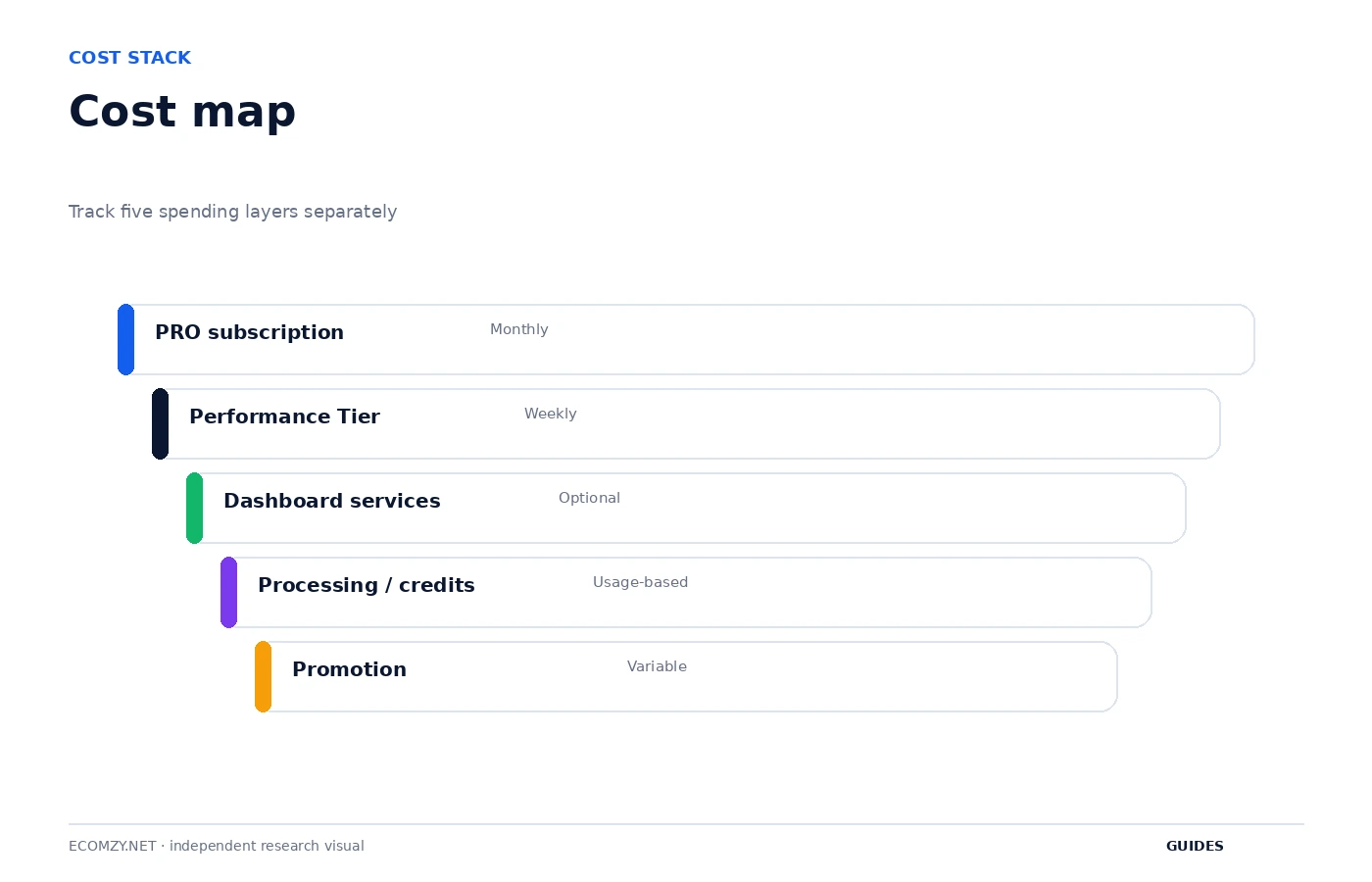
Once the map exists, attach the current account object to each row. Which PRO plan is active? Which tier is active? Which paid services are open? Are credits being purchased? Is promotion active? This gives you a current-state budget rather than a price-table exercise.
2. Normalize weekly and monthly recurring costs
Performance Tiers are currently billed weekly while PRO plans are described monthly. Convert both to the same planning period before deciding whether the total is comfortable. For a monthly budget, use the actual renewal schedule rather than simply multiplying by four if you want precise cash timing; some months contain more weekly billing events than others.
The important habit is to stop thinking of the tier as a small weekly number in isolation. A recurring weekly service becomes material over a month or quarter. Put the expected recurring total beside the base PRO subscription so the business has one realistic fixed-cost view.
3. Give every paid tool a reason and an owner
Before buying a Dashboard service or enabling a higher-tier tool, write down the reason. What problem will it solve? When will you evaluate it? Is the cost one-time, weekly, monthly or usage-based? A one-sentence justification prevents convenience purchases from becoming invisible recurring spend.
This is particularly important because the Terms describe one-click Dashboard purchases and separate service fees. Interface convenience is not the same thing as budget approval. Slow down at the final checkout: read the service, fee line items, refund condition and total before confirming.
4. Create a processing-cost envelope
Order processing can create usage-dependent costs, and the optional Order Processing Service uses prepaid credits under the current Terms. Instead of treating every order as an isolated surprise, create a processing envelope based on the actual order volume and method you expect to use. Compare actual processing-related spend with that envelope weekly.
A spike should trigger investigation, not immediate panic. Did order volume increase? Did more orders use the optional credit-based service? Did late processing occur? Classifying the cause turns cost control into an operational question rather than a generic complaint about fees.
5. Treat Promotion Service as a separate variable budget
Ads Credits and Promotion Service spending should live outside the fixed subscription budget. The current Terms describe Promotion Service purchases and a separate Promotion Service fee structure, while the public paid-ads page presents automated campaign activity. Because results are not guaranteed, this budget needs an explicit cap and review rule.
Define the maximum campaign spend before activation and record each increase. Do not let a promotional budget expand simply because higher daily packages become available. Availability is not a requirement. The budget should grow only because the business has a reason supported by its own results.
6. Reconcile Dashboard services against delivery
Paid services are not only costs; they also have delivery status. Keep purchase date, service name, checkout total, expected delivery, refund rule and completion status together. This prevents a service from remaining in the budget after it was canceled or forgotten, and it creates evidence if delivery does not match the documented expectation.
The current Terms contain different service-specific rules, so do not assume a single refund window applies to everything. Cost control includes understanding when a purchase becomes non-refundable and whether additional platform fees are refundable. Verify the current service section before acting.
7. Add redemption costs only when planning a request
Commission redemption fees are a different category from operating spend. They become relevant when an eligible Available Commission amount is actually being considered for redemption. Do not mix them into daily store costs. Instead, compare available transfer methods at the time of the request and record the expected net amount.
The Terms currently define Commission as an Ecomzy-funded promotional incentive and make payout conditional on eligibility and approval. This means a visible Available amount should not be booked as guaranteed cash before the request is approved. Conservative budgeting avoids depending on an unapproved transfer.
8. Run a weekly cost exception review
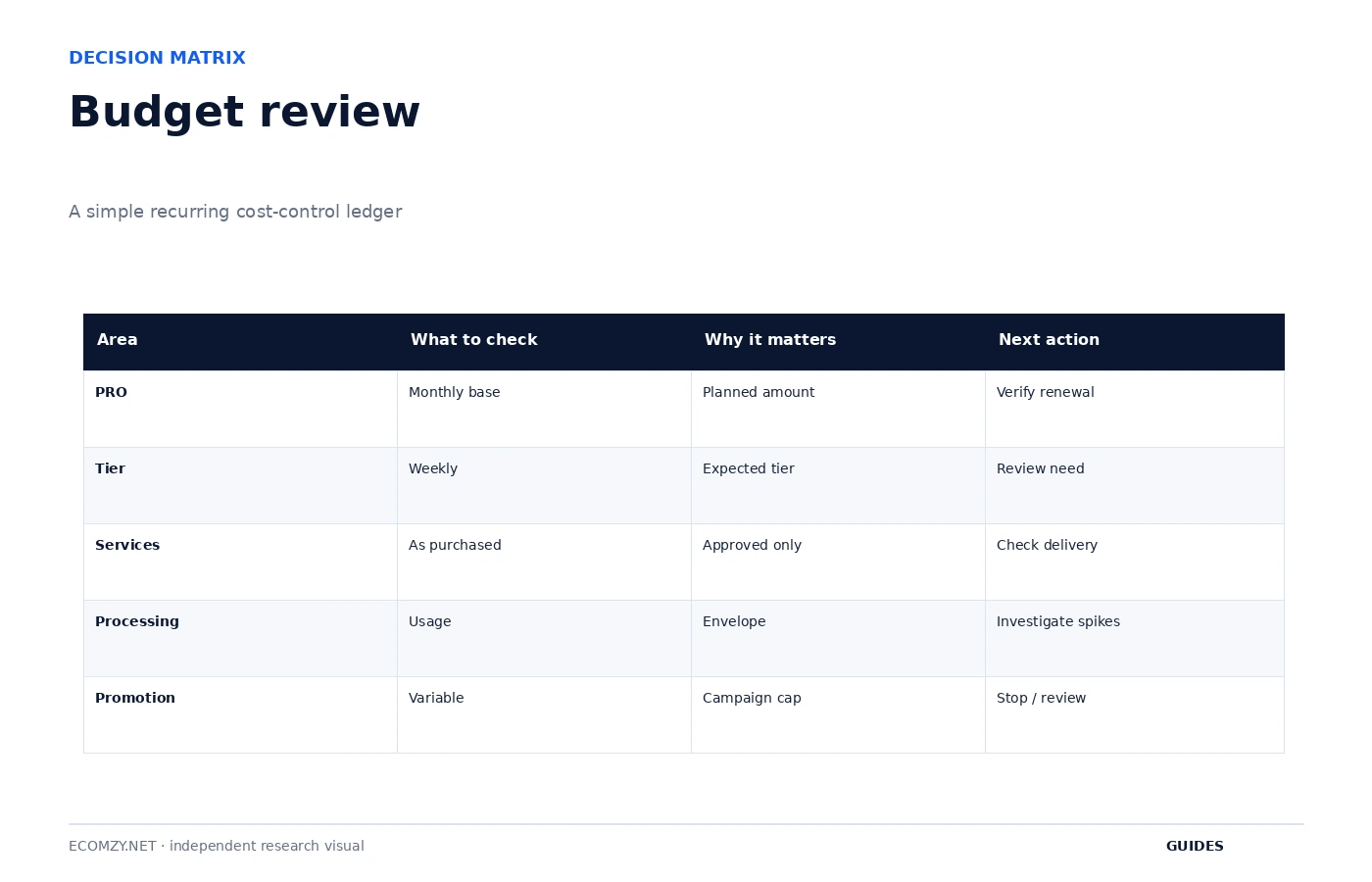
You do not need to reconcile every transaction every day. Once a week, look for exceptions: an unexpected tier, a recurring service you no longer use, a processing-cost spike, a promotional budget over the planned cap or a Dashboard purchase without a clear record. Exceptions are where cost control creates value.
Mark each exception with an action: explain, adjust, cancel or investigate. A cost with a valid reason is not a problem simply because it increased. A cost with no known reason deserves attention even if the amount is small.
9. Run a monthly full reconciliation
At month end, compare the account record, receipts and bank or card statement. Keep the categories separate and calculate the total only after the components make sense. This catches duplicate mental accounting, such as treating a service fee as though it were already included in the headline service price.
The reconciliation should also note the active tier and tools at month end. If the business is paying for a higher tier mainly because of a tool that is no longer used, that becomes a task for the next month. Cost control should produce decisions, not just a historical spreadsheet.
10. Use a stop rule for experimental spend
Every experimental service or marketing budget should have a stop condition. The condition can be time, spend or a defined business result. Without a stop rule, an automated or recurring service can continue simply because nobody made a new decision. That is cost drift.
Write the stop rule before the purchase. Examples include “review after two weekly renewals,” “do not exceed this Ads Credit budget before a campaign review,” or “cancel the service if the promised deliverable is not relevant after inspection.” The exact rule depends on the service, but the discipline is universal.
Frequently asked questions
Is $39/month the only possible Ecomzy cost?
No. The public Pricing page highlights the Basic PRO price, while the Terms describe other plans, Performance Tiers and separate services or fees.
Why should I track the Performance Tier separately?
It has a separate weekly billing cycle and can change based on usage.
Should I treat Available Commission as guaranteed income?
No. Current Terms make Commission redemption subject to eligibility and approval.
What is the simplest cost-control routine?
Keep a categorized ledger, review exceptions weekly and reconcile all recurring and paid service layers monthly.
Where to go next
Official sources reviewed
Build a ninety-day view
Monthly reconciliation can hide the cumulative effect of weekly services. Add a rolling ninety-day total for each category. A small recurring layer that looks harmless in one week becomes easier to evaluate when its quarter-level cost is visible next to the business activity it supports.
Review this item on a fixed cadence and record only changes that affect access, money, customer experience or the next operational state. The purpose of the guide is to create a repeatable decision process, not to add more routine work than the store actually needs.
Use approval thresholds
Set an internal rule that any new recurring service or increase above a chosen amount requires a written reason and review date. The threshold can be simple. Its purpose is to interrupt impulse purchases and force the business to distinguish a needed tool from a convenient button.
Review this item on a fixed cadence and record only changes that affect access, money, customer experience or the next operational state. The purpose of the guide is to create a repeatable decision process, not to add more routine work than the store actually needs.
Operating review note
At the end of each review cycle, compare the current account state with the dated baseline you created earlier. Identify what changed, which change was intentional and which object now requires the next action. If a paid or irreversible action is involved, verify the current Dashboard disclosure and current Terms before proceeding.
Keep the record concise. A useful operating note contains a date, object, state, expected next event and action owner. This structure remains useful even if Ecomzy changes menu labels or redesigns the interface because it describes the workflow rather than a particular screenshot.
Operating review note
At the end of each review cycle, compare the current account state with the dated baseline you created earlier. Identify what changed, which change was intentional and which object now requires the next action. If a paid or irreversible action is involved, verify the current Dashboard disclosure and current Terms before proceeding.
Keep the record concise. A useful operating note contains a date, object, state, expected next event and action owner. This structure remains useful even if Ecomzy changes menu labels or redesigns the interface because it describes the workflow rather than a particular screenshot.
Operating review note
At the end of each review cycle, compare the current account state with the dated baseline you created earlier. Identify what changed, which change was intentional and which object now requires the next action. If a paid or irreversible action is involved, verify the current Dashboard disclosure and current Terms before proceeding.
Keep the record concise. A useful operating note contains a date, object, state, expected next event and action owner. This structure remains useful even if Ecomzy changes menu labels or redesigns the interface because it describes the workflow rather than a particular screenshot.
Operating review note
At the end of each review cycle, compare the current account state with the dated baseline you created earlier. Identify what changed, which change was intentional and which object now requires the next action. If a paid or irreversible action is involved, verify the current Dashboard disclosure and current Terms before proceeding.
Keep the record concise. A useful operating note contains a date, object, state, expected next event and action owner. This structure remains useful even if Ecomzy changes menu labels or redesigns the interface because it describes the workflow rather than a particular screenshot.
Operating review note
At the end of each review cycle, compare the current account state with the dated baseline you created earlier. Identify what changed, which change was intentional and which object now requires the next action. If a paid or irreversible action is involved, verify the current Dashboard disclosure and current Terms before proceeding.
Keep the record concise. A useful operating note contains a date, object, state, expected next event and action owner. This structure remains useful even if Ecomzy changes menu labels or redesigns the interface because it describes the workflow rather than a particular screenshot.
Operating review note
At the end of each review cycle, compare the current account state with the dated baseline you created earlier. Identify what changed, which change was intentional and which object now requires the next action. If a paid or irreversible action is involved, verify the current Dashboard disclosure and current Terms before proceeding.
Keep the record concise. A useful operating note contains a date, object, state, expected next event and action owner. This structure remains useful even if Ecomzy changes menu labels or redesigns the interface because it describes the workflow rather than a particular screenshot.
Operating review note
At the end of each review cycle, compare the current account state with the dated baseline you created earlier. Identify what changed, which change was intentional and which object now requires the next action. If a paid or irreversible action is involved, verify the current Dashboard disclosure and current Terms before proceeding.
Keep the record concise. A useful operating note contains a date, object, state, expected next event and action owner. This structure remains useful even if Ecomzy changes menu labels or redesigns the interface because it describes the workflow rather than a particular screenshot.
Operating review note
At the end of each review cycle, compare the current account state with the dated baseline you created earlier. Identify what changed, which change was intentional and which object now requires the next action. If a paid or irreversible action is involved, verify the current Dashboard disclosure and current Terms before proceeding.
Keep the record concise. A useful operating note contains a date, object, state, expected next event and action owner. This structure remains useful even if Ecomzy changes menu labels or redesigns the interface because it describes the workflow rather than a particular screenshot.
Operating review note
At the end of each review cycle, compare the current account state with the dated baseline you created earlier. Identify what changed, which change was intentional and which object now requires the next action. If a paid or irreversible action is involved, verify the current Dashboard disclosure and current Terms before proceeding.
Keep the record concise. A useful operating note contains a date, object, state, expected next event and action owner. This structure remains useful even if Ecomzy changes menu labels or redesigns the interface because it describes the workflow rather than a particular screenshot.
Operating review note
At the end of each review cycle, compare the current account state with the dated baseline you created earlier. Identify what changed, which change was intentional and which object now requires the next action. If a paid or irreversible action is involved, verify the current Dashboard disclosure and current Terms before proceeding.
Keep the record concise. A useful operating note contains a date, object, state, expected next event and action owner. This structure remains useful even if Ecomzy changes menu labels or redesigns the interface because it describes the workflow rather than a particular screenshot.
Operating review note
At the end of each review cycle, compare the current account state with the dated baseline you created earlier. Identify what changed, which change was intentional and which object now requires the next action. If a paid or irreversible action is involved, verify the current Dashboard disclosure and current Terms before proceeding.
Keep the record concise. A useful operating note contains a date, object, state, expected next event and action owner. This structure remains useful even if Ecomzy changes menu labels or redesigns the interface because it describes the workflow rather than a particular screenshot.
Join the discussion
Share a question, correction or useful experience related to this article. First-time comments may be held for moderation.