
Ecomzy describes AI influencers as digital presenters that can introduce products through short-form videos and promotional posts. That sounds straightforward until a store owner asks the practical questions: Who are the presenters? What content do they make? Does Ecomzy publish it automatically? Can one presenter credibly talk about every product in a store? And what does the promise of seven built-in creators actually establish?
This guide separates what Ecomzy publicly documents from the decisions a store owner still needs to make. It also proposes a seven-role editorial framework for assigning useful work to those creators. The seven roles below are a planning method, not seven official persona names or job descriptions published by Ecomzy. That distinction matters: a framework can help you use a feature without pretending to know details of a private dashboard.
What Ecomzy actually says about its AI influencers
The Ecomzy homepage has described a set of seven ready-to-use AI influencers, with niche video libraries and the possibility of creating additional characters. A more recently visible version of the homepage describes AI presenters, promotional posts and videos, vertical formats for Instagram, TikTok and YouTube Shorts, and explicit owner control over what gets published. The newer public presentation does not list seven complete profiles with names, specialties and sample libraries. The marketing wording has changed, so an exact roster should be checked against the account interface rather than reconstructed from old promotional text.
One example account-style preview on the public homepage shows a creator handle, a fashion label and a video count. It is an illustrative public display, not evidence that every account receives the same named character, a fixed collection of videos or a guaranteed posting schedule. Ecomzy’s public materials likewise do not establish the licensing terms for every generated clip, how long a render takes, or whether a particular character is available on every plan. Treat those as questions to verify inside your own account or with support.
Here is a practical distinction that prevents confusion. An AI influencer is a synthetic on-screen presenter. A video asset is an individual clip featuring or associated with that presenter. A social account is the Instagram, TikTok or YouTube identity where an asset may be posted. And a campaign is the planned set of assets, destinations and measurements around a product. These are four different things. Having a presenter and a video library does not prove that an account has been created, connected or handed to you.
Seven useful creator roles, without inventing seven official identities
The best way to examine a roster is not to rank avatars by appearance. Give each creator a defined editorial job, then assess whether the available library supports that job. If all seven produce interchangeable "buy now" clips, their number adds little value. If they cover different buyer questions, content formats and product use cases, one store can give customers more reasons to pay attention.
The seven roles below are recommended editorial assignments. Match them to whichever presenters and assets your Ecomzy account actually makes available; one presenter may suit several roles, and some roles may need original content beyond the supplied library.
Role 1: The quick product explainer
This presenter answers the most basic buyer question in a single short clip: "What is this digital product, and what will I receive?" A useful explainer starts with a problem, identifies the format and shows the expected customer action. For a downloadable planner, that might mean showing a page preview, how it is used and whether it is editable. For a guided course, the script might identify modules, required time and the intended audience. It should not claim that a product delivers outcomes the listing cannot substantiate.
A good ten- to thirty-second explainer avoids jargon and puts the product itself ahead of the character. Its success criterion is clarity. After watching, could a customer describe the offer without guessing? If not, the video needs a stronger first sentence or a concrete preview, regardless of visual polish.
Role 2: The practical demonstrator
Some digital products are easier to understand when viewers see a process. This creator is responsible for showing how a template, checklist or interactive tool works. The strongest format is a sequence: starting state, one action, visible output. The presenter can introduce the task while screen capture, graphics or product imagery carries the evidence. A synthetic character should not be represented as having personally tested a feature unless the demonstration genuinely documents the relevant behavior.
For a resume toolkit, a demonstrator could explain the difference between the included worksheet and the finished document. For a planning workbook, the clip could show how users fill in a weekly schedule. The selling point is the visible operation, not a staged expression of excitement. Check every demonstrated step against the current product version before publication.
Role 3: The audience translator
Different customers use different words to describe the same difficulty. A first-time buyer may ask whether a download works on a phone; an experienced buyer may care more about formats, licensing or compatibility. The audience translator adapts explanations to one clearly defined audience segment without changing the underlying facts. This is especially useful when a store offers several distinct categories of digital products.
Create a small message brief for each segment: the question, existing knowledge, likely objection and exact product detail that resolves it. Avoid inventing demographic labels or promising that one presenter represents an entire community. Use language that would make sense to the intended buyer, and keep subtitles readable without sound.
Role 4: The objection handler
Customers often hesitate for legitimate reasons: they cannot see what is inside the download, do not understand the license, or wonder whether they need additional software. A creator assigned to objections can make short "before you buy" clips that answer one concern at a time. This is more credible than treating every hesitation as something to dismiss.
Start with the precise question. State only what the product page and terms support. Show the relevant evidence and tell viewers where to check details. Never make up a refund promise, guarantee of earnings, or unlimited reuse right. One well-sourced objection video can be reused near a product page, in a help article or as a social post, provided the usage rights allow it.
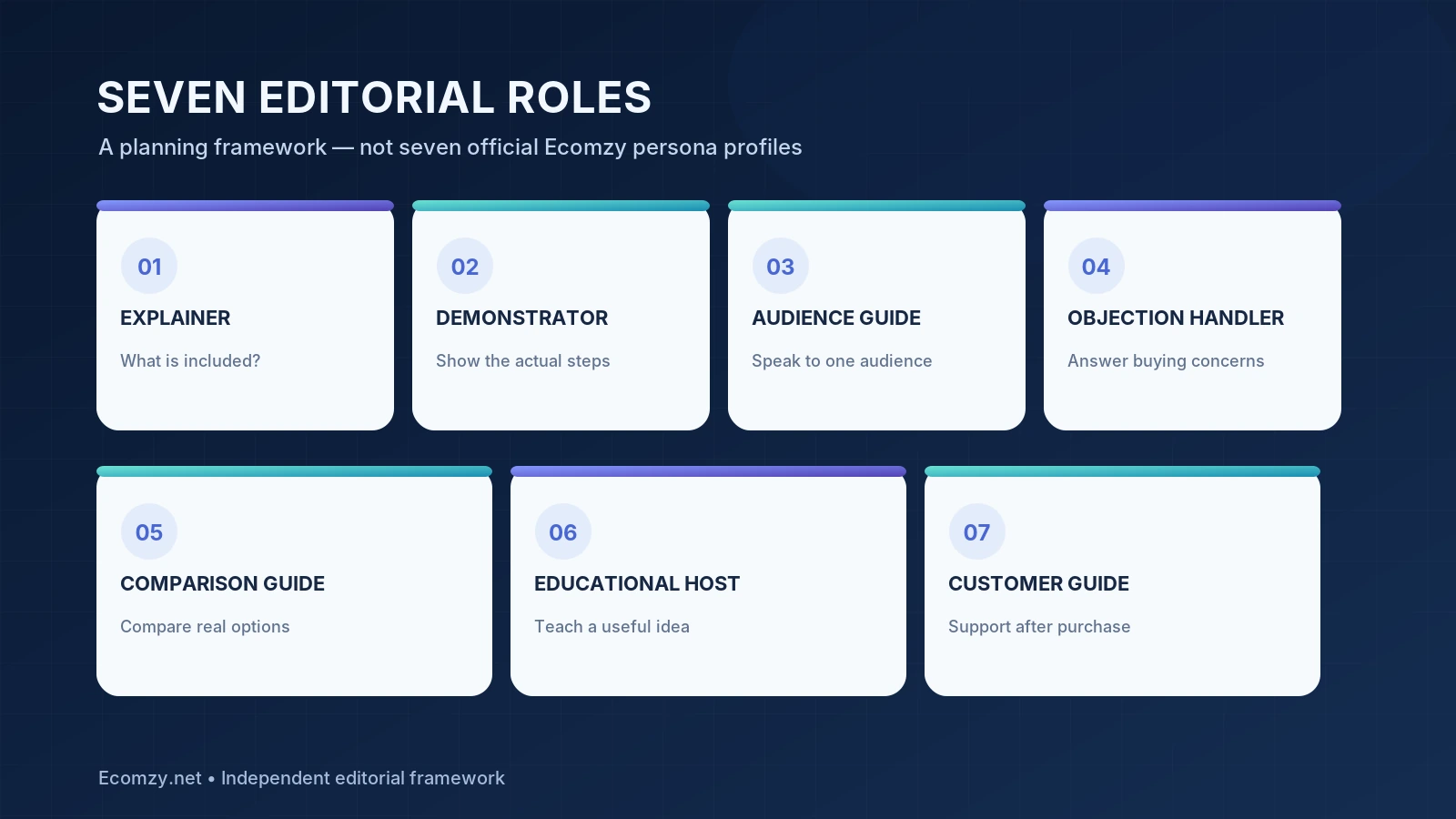
Role 5: The comparison guide
Comparison content helps someone choose between two relevant products or formats, not between vague "good" and "bad" options. A comparison presenter should identify the decision: short checklist or detailed guide, editable template or fixed reference, beginner edition or advanced edition. Then make the differences specific. A useful comparison can direct a buyer toward the less expensive option when it better fits the task.
A reliable format has three beats: who option A is for, who option B is for, and the one limitation that could decide the purchase. Keep comparisons focused on products genuinely available to the store. Do not make unsupported claims about competing brands, private features or market leadership.
Role 6: The educational host
Not every post needs a product link in its opening sentence. A good educational presenter covers a small, actionable subject adjacent to a product category. A budgeting resource might be paired with a clip on organizing recurring expenses. A study planner might be paired with a method for splitting a project into sessions. The video should be useful even to a viewer who never buys.
This role is particularly helpful when the store has a limited amount of truly new promotional material. Create a sequence of questions customers ask before they search for a specific product. Answer them clearly, then mention the relevant product only when it solves the next step. Avoid turning a general health, financial or legal suggestion into unqualified professional advice.
Role 7: The returning-customer guide
A sale is not the end of the customer journey. People may need to locate their file, understand a format or learn how to begin. A presenter assigned to post-purchase orientation can introduce the first action and point to the appropriate help page. This content can reduce repetitive questions when it matches the actual checkout and access process.
Keep post-purchase clips separate from acquisition content. Someone who already purchased a guide does not need another pitch. They need a clear next step, contact details for access problems and an honest explanation of what is included. If the platform controls fulfillment or customer communications, ask which channels you are allowed to use rather than assuming every automated sequence is editable.
How to choose the right presenter for each product
A presenter should be matched to an actual product question, not merely to a broad niche label. Begin with three products you can inspect. Read each product page, check the contents or approved preview, and write down the two questions most likely to stop a sale. Then browse the available creator videos and decide whether any clip answers those questions accurately. If it does not, do not post it solely because it looks expensive.
Consider a sample store with a weekly planning template, a beginner writing guide and a household checklist. The planning template may benefit from a demonstration. The writing guide may need an explainer that distinguishes practice exercises from personalized coaching. The checklist may work best as a quick comparison against a generic notes app. Those are hypothetical editorial scenarios, not a statement about which exact products Ecomzy provides every account.
Use a simple selection score. Rate each asset from 0 to 2 for product accuracy, audience relevance, clarity without audio, visible product evidence and credibility of the call to action. A ten-point total is easy to interpret: publishable after review at 8–10; revise at 5–7; unsuitable below 5. Accuracy should remain a hard requirement, not something that a beautiful image can compensate for.
The content workflow: from approved product to published video
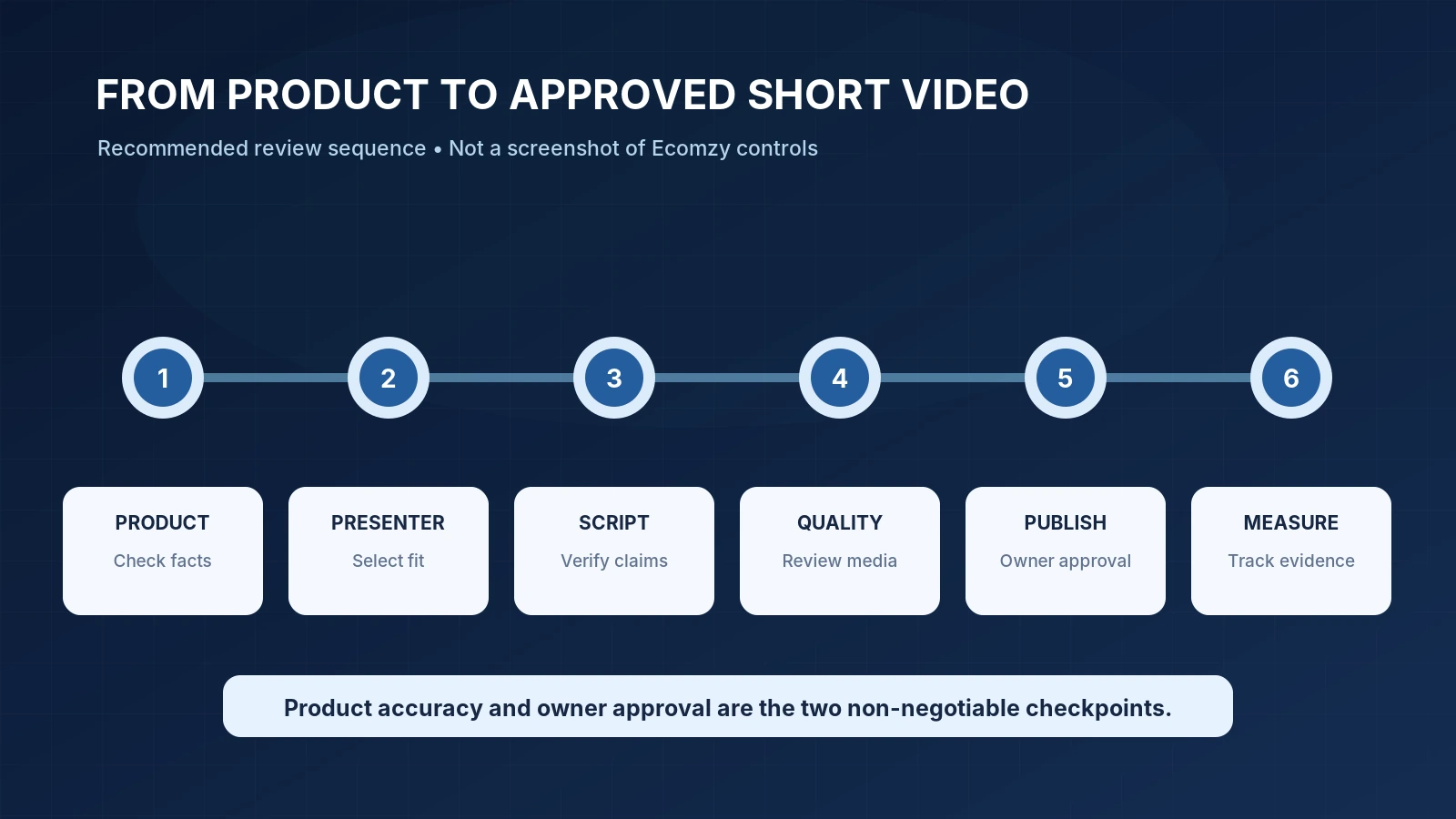
The public homepage says that owners choose what goes out and when, with no automatic posting without them. That is a useful distinction from a fully autonomous marketing service. At the time of review, the public material does not show a complete account-level click path, so the stages here describe a recommended quality-control workflow, not verified names of Ecomzy dashboard buttons.
First, select an active product and record its current title, price, principal features and URL. Second, choose a presenter or an existing asset from the library. Third, compare the script and captions with the product page. Fourth, verify the visual material: there should be no impossible buttons, broken text, fabricated reviews or misleading demonstrations. Fifth, prepare the destination URL and ensure it opens on a phone. Sixth, schedule or publish through the controls actually offered by your account and the social service. Finally, log the published URL, date, format and product destination.
That log is more important than it sounds. If a product’s price or description changes next month, you can identify which videos contain an outdated claim. If a clip is removed or an account becomes unavailable, you can distinguish missing distribution from a weak offer. It also makes it possible to learn from content without relying on vague reports of "engagement."
Vertical video, captions and a usable destination
Ecomzy publicly presents video in a 9:16 format for Instagram Reels, TikTok and YouTube Shorts. A vertical aspect ratio is a starting point, not a guarantee that a file will work identically across all three destinations. Each platform has its own upload requirements, policies and interface elements. Leave space around important labels, keep primary claims in large readable type and avoid placing the call to action where a social app will cover it.
Check captions manually. Synthetic speech can mispronounce brand names and product titles; automatic subtitles can mistake amounts or dates. A polished voice and confident-looking face do not establish the truth of a script. For material that resembles a real customer endorsement, avoid implying that the synthetic persona independently bought the product or experienced an outcome. Be transparent when a presenter is AI-generated where required by law or platform rules.
What does the word “included” cover?
Also check whether a creator remains available if a subscription changes. An asset stored on a service may not be the same as a file you have already downloaded. If continued access is essential, maintain an approved export archive and the associated product brief, subject to the service’s terms. Store a copy of the permission or licensing language that applied when you used the asset.
Measuring results without guessing at attribution
A social post can generate views without a click, and a click without a sale. Put those into separate columns. For each post, record its publication date, creator, product, channel, destination URL, available impressions or views, outbound clicks if provided, and orders attributable through a verified method. If a platform does not expose outbound clicks or verified referral data, mark the field "not available" rather than inventing a conversion rate.
Where permitted, use tagged URLs with a consistent campaign naming convention. A simple scheme distinguishes platform, content format and specific creative. But the existence of a UTM parameter does not prove that Ecomzy preserves it through every redirect or provides conversion tracking. Test a single click to the destination and confirm what your analytics can actually report.
Consider two hypothetical clips. One gets many views but few product-page visits. Another gets fewer views but produces more qualified visits. The first may be useful for awareness; the second may be more useful for a buying decision. Neither demonstrates profit without accurate order and cost information. Avoid presenting view totals, generated dashboards or platform promotional examples as independently verified store outcomes.
Questions to ask before posting your first clip
Request a sample export and confirm its resolution and file type. Ask whether the clip includes captions, background audio or licensed music. Check whether the presenter identity can be reused consistently and whether the creator’s appearance could change between generations. Establish who can edit the product claims, where the clip is stored, whether third-party service branding appears and what happens when a clip becomes outdated.
Then verify publishing rights for the social account. Is it your own profile? Does Ecomzy create or administer one? Can you choose a separate account for each niche? The public description confirms owner approval of posting, but it does not settle every account-ownership question. Record the answer for your particular setup; do not build a workflow on an assumption.
Frequently asked questions
Does Ecomzy really include seven AI influencers?
An indexed version of its homepage explicitly advertised seven included influencers. The current publicly rendered homepage describes built-in AI presenters but does not provide a complete named seven-person roster. Confirm the number and availability in the account you receive; marketing pages can change.
Are the seven roles in this article official Ecomzy personas?
No. They are a seven-role editorial framework for deciding what work a creator should perform. Ecomzy has not publicly documented each role and persona name in the sources reviewed here.
Does an AI influencer automatically post to Instagram or TikTok?
The current homepage says the owner chooses what to publish and when, and that nothing posts without approval. It does not establish that social profiles are automatically created or connected for every subscriber.
Can I use the same presenter with different products?
That may be practical if the available asset library and licensing support it. Evaluate each script for accuracy and audience fit, and verify actual account permissions before committing to a repeatable process.
Are AI influencers the same as paid ads?
No. An AI presenter is part of content production; an ad campaign buys or arranges distribution. Ecomzy describes these as distinct promotional areas, so costs and conditions should be checked separately.
Do videos guarantee store traffic or sales?
No. Distribution, audience response, the offer and the ability to measure referral activity all affect results. A polished video can explain a product; it cannot guarantee a commercial outcome.
The practical takeaway
Ecomzy’s AI influencer concept is worth evaluating as a way to prepare short-form product explanations without filming every presentation. The real decision is not whether seven digital faces sound impressive. It is whether your available assets explain actual products accurately, give you usable publication control and produce information you can measure. Start with a narrow editorial brief, verify what is included in your plan, and treat the seven creator roles as an organizing method rather than an official platform specification.
For the broader product and marketing workflow, see our guide to Ecomzy marketing tools and our Ecomzy store management guide.
Sources and verification notes {#sources}
- Ecomzy official homepage — public feature descriptions and posting-control statements; reviewed October 28, 2026.
- Ecomzy Terms of Service — subscription and separate marketing-service context; reviewed October 28, 2026.
- Google Search Central: people-first content — editorial standards for original information and clear authorship.
Independent editorial analysis. Illustrations in this article explain a recommended workflow and are not screenshots of the Ecomzy dashboard. Product features, policies and eligibility should be reconfirmed before acting on them.
Join the discussion
Share a question, correction or useful experience related to this article. First-time comments may be held for moderation.