
An Ecomzy store can look like a conventional online shop: product cards, prices, a product description and a button inviting the visitor to continue. But a familiar storefront layout does not necessarily mean that the store owner is the merchant accepting the payment. Under Ecomzy’s current terms, a Storefront without the owner’s own payment system is a pre-checkout interface. When the visitor proceeds, the transaction is completed on Ecomzy Mall. This is the detail that explains several otherwise puzzling questions about receipts, refunds, commission and orders appearing in the dashboard.
There is also a different configuration. A customer who connects their own independently operated payment system to a store accepts buyer payments directly and acts as the seller. The two models should not be compressed into a single description of “Ecomzy checkout.” This article follows the buyer through both journeys, identifies what changes for the operator, and offers an evidence-based checkout review method without pretending that every dashboard uses the same buttons.
The short answer: why a buyer leaves the Storefront
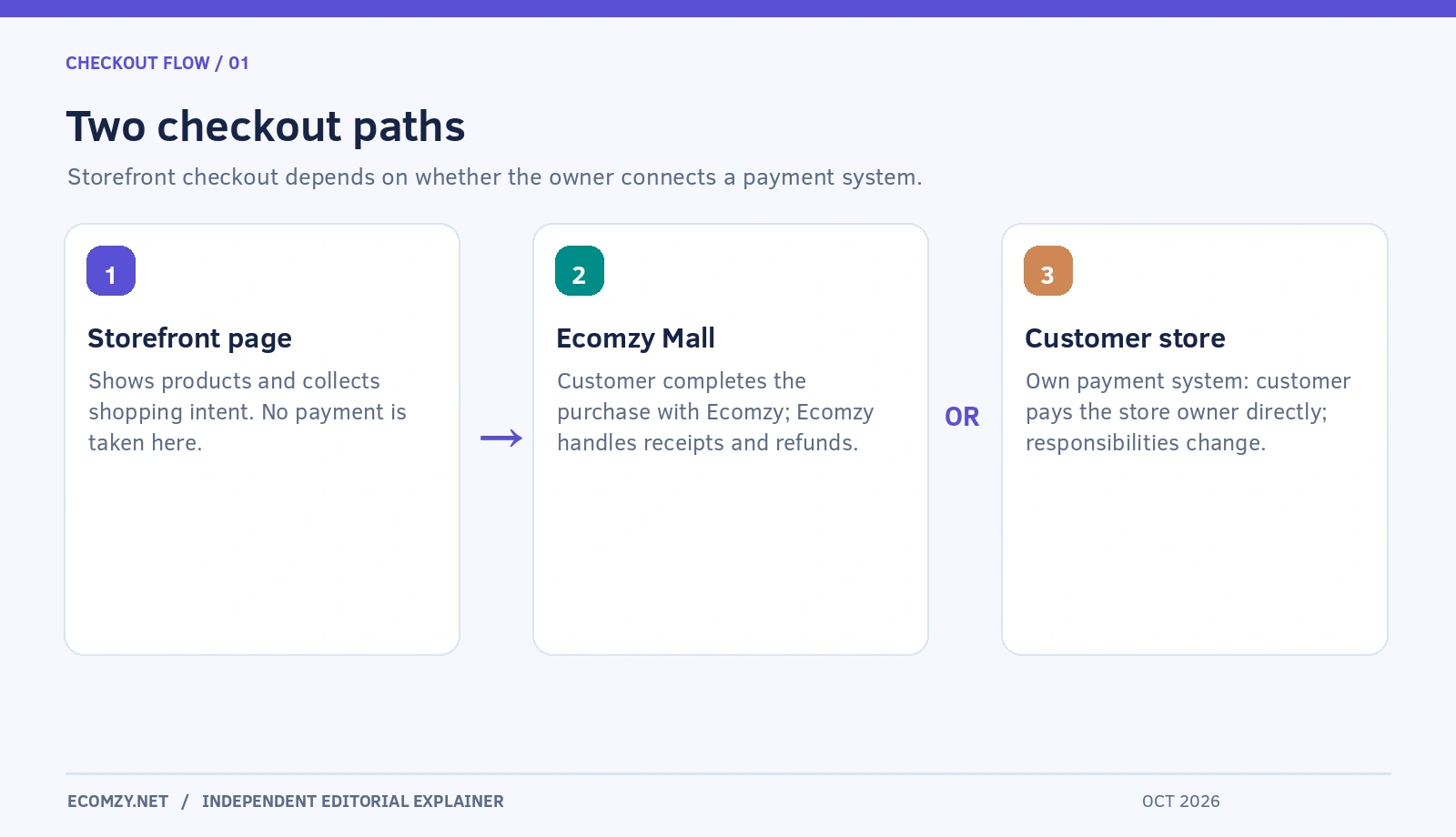
Section 1.2.3 of the Ecomzy Terms of Service describes the Storefront Configuration. If no personal payment system is connected, the shop shows product information and captures purchase intent; the customer is redirected to Ecomzy Mall for the actual purchase. Ecomzy is the seller for transaction purposes, not the Storefront operator. Its responsibilities include collecting customer money, providing receipts and handling chargebacks and refunds.
This is a functional distinction rather than a judgment about the design of the store. The visitor may start on a branded domain, but the eventual payment page is part of the Ecomzy-operated environment. A store can therefore attract a visitor without directly taking card details or settling an order to its owner. The contractual mechanism matters more than the apparent continuity of the shopping experience.
Important: this explanation applies to the Storefront Configuration. Section 1.2.2 describes the alternative with an independent payment system, in which the owner is responsible for customer transactions. The checkout path should be verified for the specific store rather than assumed from promotional screenshots.
Follow the path from product page to payment confirmation
A useful checkout audit begins with one ordinary product and a clean browser session. First, open the product page without being logged in as the store owner. Record what the visitor can see: product name, price, format, description, refund information and the call to action. Next, continue to the point immediately before payment. Note whether the site remains on your domain or moves to Ecomzy Mall. The destination is more significant than the button’s color or wording.
If the visitor is redirected to the Mall, verify that the displayed product, price, and deliverable still match the promise made on the Storefront. Distinguish a harmless change in page design from a material change in the offer. If a buyer sees a $29 digital planning toolkit on the initial site, it would be confusing to reach a payment page with a different item name, incompatible access conditions or unexplained additional charges. Never submit a test payment merely to establish the URL if the checkout can be inspected safely before confirmation.
After a legitimate purchase, the buyer should receive the communications associated with the seller’s system. Keep the Storefront and Mall roles distinct in the explanation supplied to customers: browsing began on a branded discovery page; the purchase was completed with the seller identified at the final checkout.
What the term “merchant of record” actually changes
Ecomzy’s terms call Ecomzy the seller and merchant of record for Storefront Orders and Ecomzy Ecosystem Orders. In plain language, the entity collecting the buyer’s payment also carries the related transaction obligations under the stated model. This includes the receipt, refund and chargeback process. A consumer who needs billing assistance should be guided toward the seller named at checkout rather than automatically told that the owner of the marketing page can reverse a payment.
The customer-facing difference deserves practical attention. A buyer may remember the branding of the original site but see Ecomzy on an email, statement or support interaction. That is not necessarily a mismatch; it may reflect the actual contractual sales channel. What matters is whether the relationship was communicated clearly before the buyer paid. A Storefront owner can explain the handoff accurately without claiming to have access to payment operations they do not control.
For the operator, the same principle limits what can be inferred from a completed order. A customer payment on Ecomzy Mall is not money deposited into the Storefront owner’s payment account. The terms distinguish customer receipts from customer-funded settlements and from a separate, Ecomzy-funded promotional Commission program. This separation is central to understanding the account’s financial displays.
Storefront Order, Ecosystem Order and Customer Store Order are not synonyms
The current terms classify orders by how they arise and where they are attributed. A Storefront Order results from a shopper sent from a Storefront to Ecomzy Mall and is not attributed to Ecomzy’s Promotion Service. An Ecomzy Ecosystem Order is placed on an Ecomzy-operated channel and attributed to a Partner Account. Ecosystem Orders are further designated Promoted or Organic depending on Ecomzy’s attribution. A Customer Store Order is created under an owner-managed payment system and submitted through that configuration.
These names solve different problems. Storefront is about the pre-checkout source; Ecosystem is about platform channels and Partner Account attribution; Customer Store is about the owner’s own checkout. The terms explicitly state that a Storefront Order is not an Ecomzy Ecosystem Order. It is therefore misleading to call every redirected checkout a “paid ad sale,” or to assume that any order visible in an Ecomzy account was made through the owner’s public domain.
When reviewing a report, check the actual order classification before comparing performance. A promotion-attributed order should not be treated as proof that the owner’s own site converted. Equally, a Storefront Order is not, by definition, proof that a paid Ecomzy campaign generated the visit. These distinctions are especially valuable when assessing which of your own marketing activities deserve credit.
What happens if you connect a personal payment system?
Under Section 1.2.2, the owner who connects an independently operated payment solution becomes the party receiving customer payments and acting as seller. Ecomzy says it has no involvement in or visibility of those customer-facing funds. The owner takes on the transaction records, customer refunds, disputes, fraud exposure and applicable compliance responsibilities. Ecomzy’s contractual role in that path is supplying products and fulfilling eligible orders submitted by the customer.
This is more than a technical gateway setting. If the owner becomes seller, policies, payment statements, consumer support and the mechanics of reconciliation all change. The owner should not adopt this arrangement solely to keep visitors on their own domain without understanding the operational work attached. The platform’s Terms also say that a Customer Store Order is possible only when the personal payment system is connected and that it is submitted by the customer operating the store.
A prospective operator should establish whether the assigned store plan and configuration actually permit the desired option. The public Terms define the model; they do not establish that every person receives the same payment integrations or can switch modes instantly through a specific dashboard control.
A responsibility table for two configurations
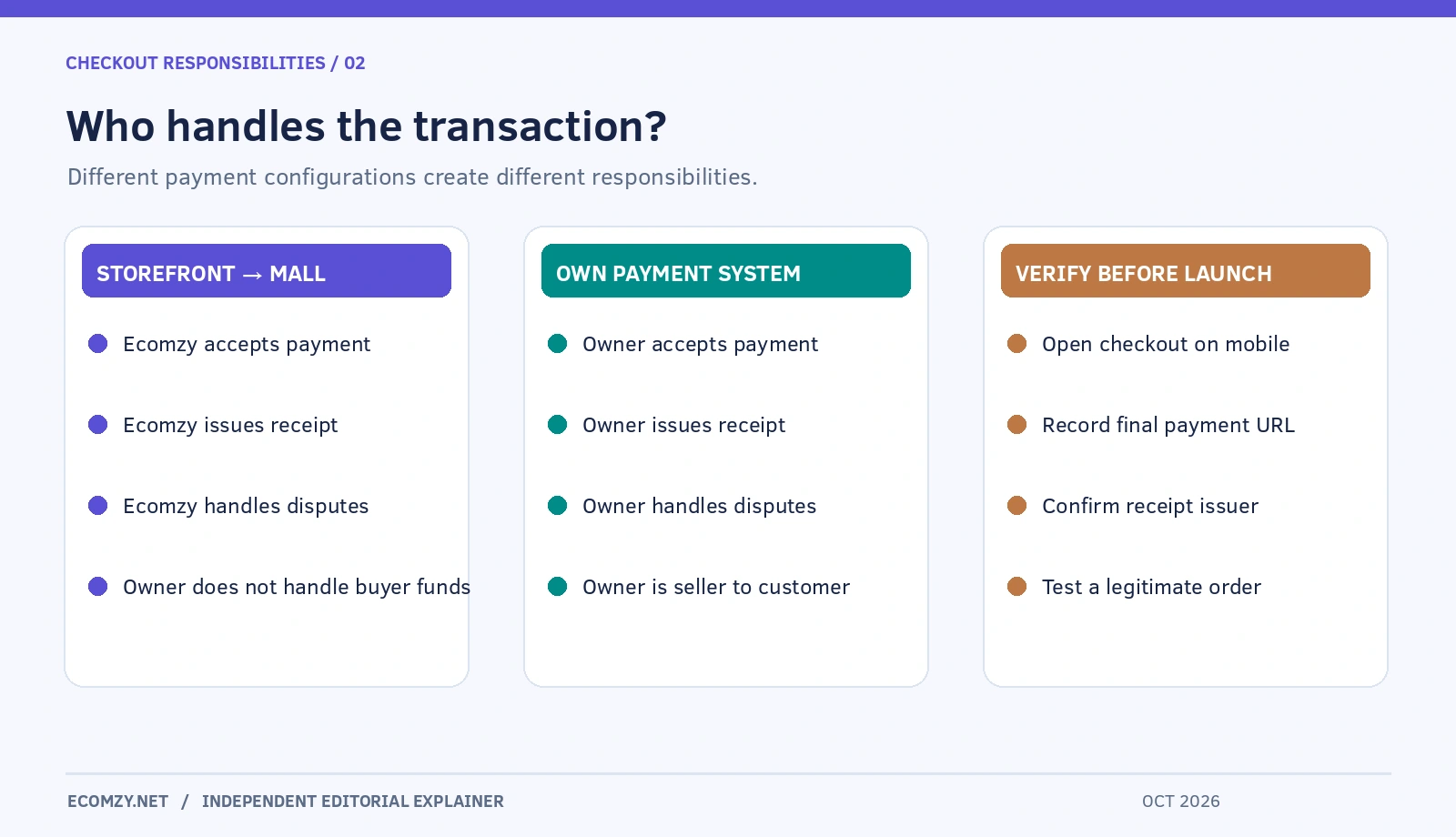
| Question | Storefront → Ecomzy Mall | Own payment system |
|---|---|---|
| Who receives buyer payment? | Ecomzy | Store owner |
| Who acts as seller to buyer? | Ecomzy | Store owner |
| Who handles payment disputes? | Ecomzy | Store owner |
| Where is the sale completed? | Ecomzy-operated checkout | Owner’s independent checkout |
| Does the owner receive the Mall buyer payment? | No | Not applicable to owner checkout |
| What should be checked? | Redirect, product consistency, seller identity | Gateway, records, refunds, fraud processes |
This table describes the payment models in the published Terms, not a live confirmation that a particular account supports a given integration. It also does not turn the promotional Commission mechanism into a percentage of buyer funds. Those are separately defined concepts.
Where Commission fits into the Storefront journey
The separation of buyer payments from Commission can seem unusual to someone accustomed to a traditional storefront. The published conditions describe Commission as an incentive Ecomzy may allocate from its own funds under the Partnership Program, subject to eligibility and validation. They specifically exclude characterizing that Commission as customer money or a payment settlement. This means a buyer spending $40 at the Mall does not create an automatic obligation to remit a fixed portion of that $40 to the Storefront operator.
The program may be linked to activity attributed to the Partner Account or orders originating from a Storefront. However, the terms preserve Ecomzy’s role in attribution and its eligibility conditions. This article intentionally does not calculate “store revenue” from example buyer payments because doing so would confuse two distinct financial flows. The existing Ecomzy commission guide discusses the request process separately.
The right operational habit is to reconcile three views: evidence of the buyer-facing transaction, the order classification in the dashboard and any separately allocated Commission. Those views are related but not interchangeable. They may also be subject to separate timing, approval or validation steps.
Product pricing on a Storefront is not a free editing field
The Terms impose an important restriction in the Storefront Configuration: product listing prices are controlled at platform level. The owner is not permitted to set, override or modify them. This extends to the Partner Account context. The fact that a WordPress-based site technically exposes editable information is not permission to override platform-controlled catalog prices. The technical ability to enter a value and the contractual right to change that value are separate questions.
When building buyer-facing pages, make sure that descriptions, examples and promotional graphics agree with the final Mall listing. Do not embed a different price in a custom banner or email if it conflicts with the actual offer. If you find a discrepancy, document both URLs, the time and the product ID if visible, and request clarification before running a campaign that repeats the discrepancy at scale.
Store owners can still contribute meaningful value through accessible explanations, accurate descriptions and clear navigation, provided changes are allowed by their configuration. The most useful merchandising improvements often concern what the buyer will receive rather than manipulating a price field.
What the buyer should see before leaving your domain
A well-designed transition should answer four questions without requiring the buyer to investigate the Terms: what the product is, what its final price is, who will collect payment and what happens after purchase. The product description should say whether the offer is a template, guide, digital tool or another deliverable and should avoid implying functionality that the actual file or access system does not provide.
The call to action can be straightforward: continue to secure checkout with Ecomzy Mall. That framing prevents the buyer from being surprised when the browser changes domains. It is also sensible to include a clear route to the relevant contact or help page for order access and refunds. Avoid copying an unverified payments logo or making assurances about particular processors unless the final checkout actually uses them.
On mobile, inspect whether the transition creates an unexpected new window, broken back-navigation or a confusing return to the original shop after payment. A smooth user journey matters because the buyer may attribute any problem to the first brand they encountered even if another company ultimately handles payment.
A repeatable pre-publication audit
For each promoted product, create a short audit record with the initial product URL, the destination before payment, the shown price, deliverable description, visible seller identity, refund-policy location and review date. Repeat it using desktop and mobile layouts. A genuine purchase can be checked later with authorized account access, but do not use someone else’s personal information or fabricate a sale merely to complete the checklist.
The audit should include a link to the owner’s own privacy notice and the appropriate buyer support route. When the checkout changes domains, a visitor may encounter different cookies, data-handling statements and policy text. A storefront operator should not automatically claim that the original site’s privacy policy covers all processing performed by the eventual seller.
Recheck the route when Ecomzy changes a product, when you adjust your site’s domain or when a visitor reports an unexpected checkout destination. Monitoring a small number of representative products is more useful than declaring the entire catalog flawless after one click. Keep dated evidence; the platform can modify its presentation or conditions over time.
How redirects interact with analytics
A transition to Ecomzy Mall can make traditional website analytics harder to interpret. Visits and product-page clicks on the Storefront do not directly establish final purchases on the Mall. A web analytics property on the originating domain can measure traffic and outbound click events, but it cannot automatically measure checkout completion or buyer receipts controlled by another service.
Use careful vocabulary in reports: “product-page visitor,” “clicked through to Mall,” “dashboard-reported order” and “validated Commission” are distinct milestones. Avoid inventing a conversion rate by dividing attributed Ecosystem Orders by visits to your Storefront; Ecosystem Orders might not originate on your site. Attribution under the Promotion Service is governed by Ecomzy’s internal data and may not expose individual placements to the owner.
A credible report can still be useful. It can show content effectiveness on the owner’s site, clarity of handoff and dates when particular product pages were reviewed. Those measurements support better decisions without pretending to reconstruct an end-to-end checkout session for which the owner has no data.
The most common misconceptions to avoid
One misconception is that “my shop has a checkout button” means “my business processes the payment.” In a Storefront Configuration, the button can be a route to the seller’s checkout. Another misconception is that “Ecomzy holds my customers’ money” describes the relationship accurately. The current Terms state that Ecomzy receives payment as seller in that model; it is not holding the buyer’s proceeds on behalf of the owner.
A third misconception is that all orders visible in the account came from the Storefront. Ecomzy Ecosystem Orders are linked through platform channels and attribution rules, whereas Storefront Orders arise through the Storefront-to-Mall route. Finally, a Storefront operator should not assume that an advertising charge buys control over the exact Mall checkout flow or creates a right to alter platform-set prices.
These misunderstandings are preventable through a simple diagram and carefully labeled reporting. They are worth correcting at onboarding because the mistake can spread into customer support scripts, internal performance tracking and expectations about payouts.
Frequently asked questions
Does every Ecomzy customer have to redirect buyers to Ecomzy Mall?
No. The published Terms distinguish a Storefront without a personal payment system from a store with an independently operated payment system. The former redirects to the Mall; the latter lets the owner take payments directly and act as the seller. Which configuration is available to an individual customer must be established in that account.
Is the Mall checkout part of my WordPress website?
The Terms describe Ecomzy Mall as Ecomzy’s ecommerce site, not the operator’s private WordPress checkout. A branded storefront can initiate the journey without owning the final transaction. Verify the actual destination instead of relying on visual similarity.
If a buyer asks me for a refund, what should I say?
For a Storefront Order, direct the buyer to the seller and published support route for the Ecomzy Mall transaction. Help them locate the order confirmation without requesting full payment-card details. If your own payment system processed the purchase, your store is responsible for managing the buyer’s refund under its applicable terms and law.
Can I set whatever price I want on my Storefront?
Not under the Storefront Configuration described by the Terms. Product listing prices are platform-controlled and unauthorized modifications are prohibited. Different rules may apply to the customer’s own independently sold products, but you must establish the actual model and applicable rights before changing anything.
Is a redirected Mall order guaranteed to generate Commission?
No. The Terms describe a distinct promotional allocation and validation process with eligibility requirements. A purchase and an allocation are not the same event. Do not promise earnings on the basis of a checkout redirect alone.
Does this mean Ecomzy collects money on my behalf?
No, not in the Storefront model as currently described. Ecomzy says it collects the buyer’s funds as the seller, retains the full amount and does not receive the money on behalf of the Storefront operator. A separate Commission may be funded by Ecomzy under its own conditions.
Final perspective
The reason a Storefront visitor finishes paying on Ecomzy Mall is structural: under the published pre-checkout arrangement, the Storefront discovers and presents the product while Ecomzy completes the sale. Understanding that split makes it easier to explain receipts, order types, price control and Commission. Before promoting any offer, follow the real buyer journey, identify the seller, and check the exact payment configuration assigned to your store.
Source and review date: Ecomzy Terms of Service, particularly Sections 1.2.2–1.2.4, 1.3 and 1.4, accessed October 28, 2026. Related: How Ecomzy Orders and Order Processing Work and How Ecomzy Works. This is independent editorial analysis; diagrams are explanatory illustrations, not actual checkout screenshots.
Join the discussion
Share a question, correction or useful experience related to this article. First-time comments may be held for moderation.